
Have you been wondering what’s new in Microsoft Teams 2025? As Microsoft continues to evolve and enhance its workplace tools, the 2025 update brings exciting changes to Microsoft Teams. The latest version promises significant improvements that make teamwork easier and more efficient. Whether you are a business owner, an IT administrator, or a regular user, it’s essential to stay informed about the features of Microsoft Teams 2025 and updates.
With the rise of remote work and hybrid teams, Microsoft Teams has become a vital part of daily collaboration. The Microsoft Teams update is designed to improve performance, introduce smarter features, and help you get the most out of your workday.
At TECHOM Systems, we break down these changes for you, helping you understand the key updates and how to implement them effectively.
In this blog, we’ll discuss the latest Microsoft Teams release, the new Teams download options, and how these updates can enhance your productivity and communication.
What is Microsoft Teams?
Microsoft Teams is a collaboration platform that helps teams communicate and work together in real-time. It combines chat, video meetings, file sharing, and task management in a single app. Teams is a central hub for collaboration, making it easy for teams to stay connected and productive. Doesn’t matter whether they are working in the office or remote location.
The platform integrates with other Microsoft 365 tools like Word, Excel, and SharePoint, streamlining workflows.
It’s widely used by businesses, educational institutions, and organizations to support both small and large teams. With the Microsoft Teams 2025 update, the platform continues to evolve to meet the needs of modern, hybrid work environments.
Quick Tips: Is Microsoft Teams Premium Worth the Investment?
What’s new in Microsoft Teams 2025 – An Overview
The Microsoft Teams 2025 update introduces major improvements to the app’s speed, functionality, and overall user experience. With this new version, Microsoft focuses on enhancing performance, collaboration, and productivity for modern teams and organizations.
Here’s what’s new in Microsoft Teams 2025:
#1: Faster and Smoother Experience
- The latest Microsoft Teams release significantly boosts performance, ensuring faster launches and smoother operation.
- Reduced memory usage improves app performance, even on older systems with limited resources.
- Users experience fewer crashes and delays, which helps improve productivity.
#2: Support for Hybrid and Remote Teams
- The new version of Teams is optimized for hybrid teams, remote workers, and educational institutions.
- Whether on desktops, tablets, or mobile phones, Teams 2025 ensures smooth and efficient communication across devices.
#3: Enhanced Security
- Microsoft Teams 2025 comes with enhanced security updates to protect user data, providing peace of mind to businesses and IT professionals.
#4: AI-Powered Features for Smart Collaboration
- Artificial Intelligence introduces tools like smart replies, meeting summaries, and task automation.
- Teams 2025 helps users stay organized and saves time by handling routine tasks like note-taking and summarizing discussions.
Top Features of Microsoft Teams 2025
Microsoft Teams 2025 introduces powerful upgrades that improve meetings, design, speed, and collaboration across all types of users. Let’s break down the top features in Microsoft Teams 2025:-
#1: Smarter Meetings with AI Enhancements
- One of the best parts of the Microsoft Teams 2025 update is its smart AI-powered meeting tools.
Key Features Include:
- Microsoft 365 Copilot Integration
Meetings now offer automatic summaries and clear transcriptions in real-time without any manual effort. - Actionable Task Lists
The update includes task lists so users can follow up easily after each meeting ends. - Speaker Recognition
This feature helps identify who said what, improving understanding and reducing confusion during meetings. - Hands-Free Documentation
These Microsoft Teams 2025 features allow you to focus on speaking while Teams handles all note-taking automatically.
#2: New Design and Faster Performance
- The new Teams download comes with a better design and improved speed for a more enjoyable user experience.
Key Improvements Include:
- Faster Load and Join Time
It now loads twice as fast and lets you join meetings quickly on any supported device. - Lower Memory Usage
The new version of Microsoft Teams uses fifty percent less memory than previous releases. - Reduced Disk Space
Disk space usage is much lower now, making the software lighter and easier to install. - Smoother Multitasking
Switching between calls, chats, and apps now feels quicker and more responsive than before. - Modern Cross-Platform Layout
Users can now enjoy a fresh design that works well on Windows, macOS, and
mobile platforms.
#3: Improved Chat and Collaboration Tools
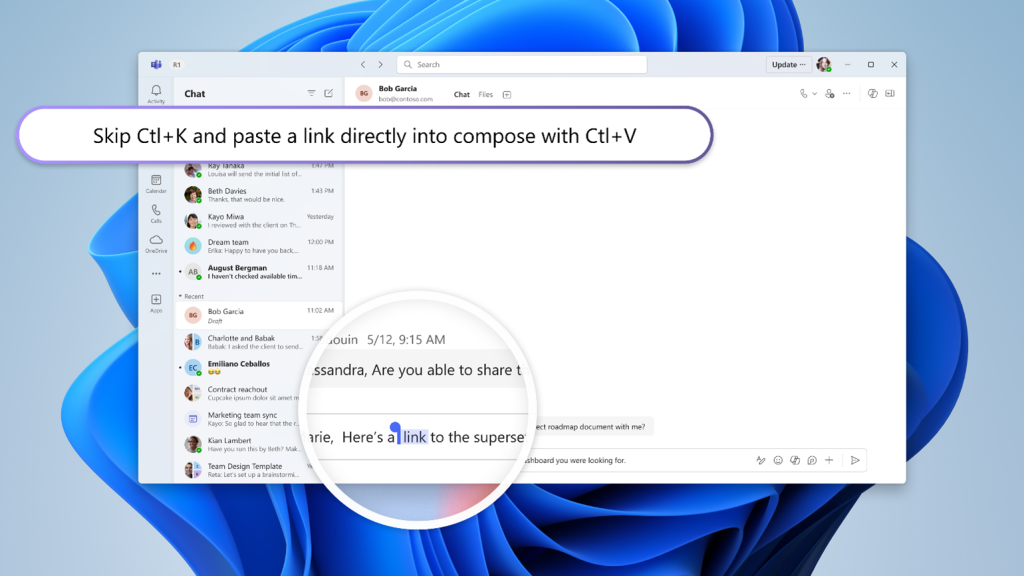
- The Microsoft Teams update includes better tools for chatting, file sharing, and improving daily team communication.
Key Enhancements Include:
- Redesigned Chat and Channel Layouts
Group chats and channel layouts are improved to help teams manage conversations faster and more effectively. - Easy Account Switching
Users can switch between accounts and tenants without logging out or restarting the app every time. - Faster File Sharing
File sharing is much quicker now, and files are easier to find inside chats and channel threads. - Streamlined Collaboration Experience
These Microsoft Teams 2025 features improve teamwork for both small businesses and large enterprise-level teams. - Enhanced Daily Productivity
The Microsoft Teams update brings tools that save time and keep everyone connected throughout the workday.
- Redesigned Chat and Channel Layouts

How to Get the New Teams Download?
If you want to experience the full potential of the Microsoft Teams 2025 update, switching to the new Teams app is the best way forward. With enhanced features, faster performance, and smarter tools, the new Teams download will help you get more out of your day. The update is designed for smoother meetings, better collaboration, and improved productivity, making it essential for all users to switch to the latest version.
You can access the Microsoft Teams download through the official Microsoft Teams website or via the Microsoft 365 dashboard.
It is easy to download and install on a variety of platforms, including Windows, macOS, iOS, and Android. If you have been using Teams for a while, you are already familiar with the interface, but this new version brings numerous improvements that you won’t want to miss.
Here’s how to get it:
- Open your latest version of Microsoft Teams app and make sure it is updated properly.
- Click the toggle at the top that says Try the new Teams and wait for it to load.
- Follow the installation instructions carefully and let the system complete the Microsoft Teams download.
- If needed, you can switch back to the classic version anytime while testing the new experience.
- The new Teams download is available for users on Windows, macOS, iOS, and Android platforms easily.
Free Guide For You: Create These 5 Cool Team Spaces Today In Microsoft Teams
Key Differences Between Microsoft Teams 2025 and Previous Versions
Here is a comparison of the key differences between Microsoft Teams 2025 and previous versions:
| Feature | Microsoft Teams 2025 | Previous Versions |
|---|---|---|
| Speed and Performance | 2x faster loading time, improved meeting join speed | Slower launch times and meeting joins |
| AI-Powered Features | Includes automatic meeting summaries, live transcription, and task lists | Limited AI tools, manual note-taking |
| Memory and Disk Usage | 50% less memory and disk space usage | Higher memory and disk space usage |
| Design | Modern, intuitive layout, easier to navigate | Older, less user-friendly design |
| Collaboration Tools | Enhanced chat interface, faster file sharing, better channel management | Slower file sharing, limited collaboration tools |
| Security | Improved security features for better data protection | Basic security features |
| Cross-Platform Compatibility | Works seamlessly across Windows, macOS, and mobile devices | Inconsistent experience across platforms |
Why It Matters for Australian Businesses?
Australians are curious to know about every update in the applications they use whether it’s Microsoft Teams or Microsoft Outlook. Let’s discuss here about what’s new in Microsoft Teams 2025. As remote and hybrid work becoming the norm, this update provides essential tools for better collaboration. Here’s why it matters:
#1: Faster Loading and Improved Performance
The new version of Microsoft Teams 2025 ensures faster loading times, making it easier to get started with meetings and collaboration sessions. This leads to improved productivity for Australian businesses.
#2: Smarter Meeting Tools
With AI-driven features like meeting summaries and live transcription, Teams 2025 makes meetings more efficient. Australian businesses can save time and reduce manual note-taking during important discussions.
#3: Better Collaboration for Hybrid Teams
The updated Microsoft Teams tools help improve communication and collaboration, especially for remote and hybrid teams. This is essential for businesses and educational institutions across Australia that rely on virtual teamwork.
#4: Boosts Productivity for SMBs and Educational Institutions
Microsoft Teams 2025 simplifies workflows, reduces technical issues, and enhances team productivity. This makes it especially valuable for Australian SMBs that need efficient and reliable communication tools.
#5: Tailored Support from TECHOM Systems
At TECHOM Systems, we understand the unique challenges faced by Australian businesses. We offer Microsoft Teams training, rollout, and troubleshooting services to ensure you make the most of this update.
Why Choose TECHOM Systems for Microsoft Teams 2025?
At TECHOM Systems, we specialize in helping businesses and educational institutions make the most of Microsoft Teams. Here’s why you should choose us:
Expert Guidance on Microsoft Teams 2025
Our team stays up-to-date with the latest Microsoft Teams updates, ensuring you get expert advice and guidance on new features and updates.
Seamless Microsoft Teams Training and Support
Whether you’re transitioning to Microsoft Teams or need training on the latest features, we offer tailored training programs to suit your team’s needs.
Custom Solutions for Your Business
We understand that every organization is different. We provide customized Teams solutions that align with your business goals and enhance productivity.
Troubleshooting and Technical Support
If you encounter any issues with Teams, our expert team provides fast troubleshooting and support to resolve any problems swiftly.
Experience in Serving Australian Businesses
With a deep understanding of the Australian business landscape, we offer local support for organizations across the country.
Choose TECHOM Systems to enhance your Microsoft Teams experience and optimize your collaboration tools. Also, you can check TECHOM Systems at Microsoft Partnership Portal.
Frequently Asked Questions
#1: What’s New in Microsoft Teams 2025?
Microsoft Teams 2025 includes AI-powered meeting recaps, faster performance, a new user interface, and simplified collaboration tools.
#2: Is the New Teams version Faster?
Yes. Microsoft says the new Teams is up to 2x faster and uses 50% less memory and disk space.
#3: How to Get the Latest Microsoft Teams Update?
You can get it via the “Try the new Teams” toggle in your current app or download it from the official Microsoft Teams page.
#4: Can Users Switch Between Old and New Teams Versions?
Yes, Microsoft allows users to switch back during the rollout phase if needed.
#5: Why to Choose TECHOM Systems for Microsoft Teams 2025 Support?
TECHOM Systems provides expert support and training, helping you know what’s new in Microsoft Teams 2025 and helps navigate the new features of Microsoft Teams 2025. We offer customized solutions for your organization, ensuring your team can fully leverage Teams for improved productivity and collaboration.
Final Thoughts
You must have gone through what’s new in Microsoft Teams 2025 in this blog. This major update enhances performance, collaboration, and productivity. Microsoft Teams 2025 introduces AI-driven features, faster speeds, and a revamped interface that streamlines your team’s workflow.
At TECHOM Systems, we are excited about these updates and how they improve the overall Teams experience. Whether you’re new to Teams or upgrading, our team is ready to assist you with installation, training, and ongoing support.
Ready to Experience What’s new in Microsoft Teams 2025?
Don’t miss out on the incredible features of Microsoft Teams 2025! Stay ahead of the curve and enhance your team’s collaboration.
Contact TECHOM Systems today for expert support, training, and seamless implementation. Let’s unlock the full potential of Microsoft Teams together!