
Key Insights:
More organisations are choosing OneDrive for business cloud storage to simplify access, collaboration, and file management.
Built-in encryption and compliance features strengthen data protection for businesses of all sizes.
Teams work faster with real-time document editing and smoother sharing across devices.
Scalable storage helps growing companies manage increasing data without hardware investments.
OneDrive data migration and OneDrive migration for enterprises enable safe, structured transitions from old systems.
Cost efficiency improves as businesses reduce spending on servers, maintenance, and storage equipment.
TECHOM Systems offers expert guidance, helping companies plan, migrate, and optimise their cloud environment with confidence.
Have you ever tried locating a file while rushing between meetings and realised it’s sitting on a device you don’t have with you? Or maybe your team struggles to collaborate smoothly because everyone is sending different versions of the same document? Have you worried about data safety while working remotely? These situations are becoming common for businesses of every size. As operations expand across multiple locations and employees work from anywhere, organisations need a storage solution that is secure, centralised and simple to use. That’s why so many companies are turning to OneDrive for business cloud storage.
If you are trying to solve file management challenges or planning to modernise how your team works with digital data, you may already be considering this platform. Over the years, I’ve seen countless companies benefit from smarter storage systems and many of them started their journey with help from TECHOM Systems. With the right guidance and migration planning, businesses unlock the full value of OneDrive for business cloud storage much faster.
Let’s explore why organisations are making the switch and how this platform improves the way teams work.
The Shift Toward Smarter Cloud-Based File Management

Daily business operations involve emailing proposals, updating spreadsheets, preparing presentations, collaborating on reports and storing sensitive information. Traditional on-premise file servers rarely keep up with modern needs because they require heavy maintenance, frequent updates and physical access. The digital workplace demands mobility, security and instant access.
OneDrive for business cloud storage solves these challenges with a cloud-first model that stores everything securely online. Teams can access files through laptops, tablets, mobile devices and shared workspaces. This flexibility becomes extremely valuable when employees work remotely or travel frequently.
Companies also appreciate how the platform integrates with Microsoft 365. Word documents, Excel sheets, PDFs, videos and large project files stay synchronised across devices. Nobody wastes time searching for the “latest version.” Instead, collaboration becomes much smoother, helping teams complete tasks faster.
Upgrade the way your team stores, shares and secures data. Move to OneDrive for Business with confidence and experience smarter cloud storage today. Contact TECHOM Systems today to book a free consultation…

Why OneDrive For Business Cloud Storage Is Becoming The Preferred Choice
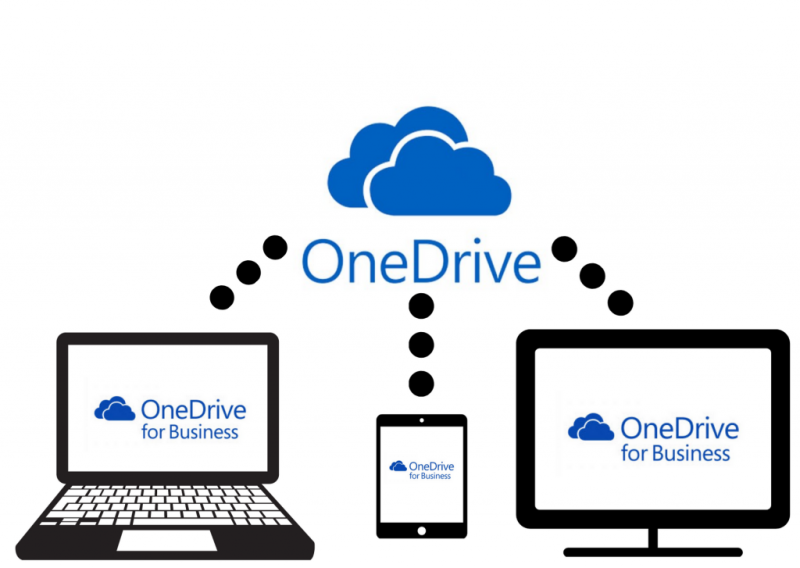
Many organisations today are rethinking how they store, manage and share their files. They want something faster, more secure and easier for teams to use across locations. When they compare their options, they often realise that the features available match exactly what their daily operations need. That’s why more companies are shifting toward this platform with confidence.
1. Easy access across devices
Teams can open, edit and share files from anywhere. Whether someone is working from home, visiting a client or on the road, their data is always within reach. This accessibility boosts workplace productivity because it eliminates delays caused by location-based restrictions.
2. Strong built-in security
Security is a major reason organisations adopt OneDrive for business cloud storage. Data is encrypted in transit and at rest. Threat protection helps detect abnormal file behaviour. Secure sharing ensures only the right people access sensitive information. Many companies discuss Microsoft OneDrive security during their planning phase and they’re often surprised by how comprehensive the protection features are. Microsoft OneDrive security also aligns with compliance needs across industries.
3. Team collaboration becomes smoother
Multiple users can work on the same document in real time. Edits, suggestions and comments appear instantly. This helps large teams avoid confusion and move projects forward without version conflicts.
4. Scalable storage for growing companies
As your organisation grows, the amount of data you handle grows too. OneDrive for business cloud storage scales easily without expensive hardware upgrades. Businesses simply increase their cloud capacity when needed.
5. Cost efficiency
You eliminate costs associated with physical storage, repairs, server maintenance and hardware expansion. Cloud storage also reduces downtime risks that often come with onsite equipment failures.
6. Smooth migration options
Many organisations start their journey with OneDrive data migration. They move files, folders and workspaces from old servers into the new cloud environment with professional support. OneDrive data migration ensures everything transfers safely, including permissions and shared access. Companies that require deeper planning often opt for OneDrive migration for enterprises, which is structured for large-scale data transfers without affecting business operations. OneDrive migration for enterprises typically involves staged transfers, security checks and pre-migration assessments.
Did You Know?
A surprising number of companies don’t realise how much time they lose to poor file management. Many employees spend more than two hours every day searching for files or recovering lost documents. With OneDrive for business cloud storage, teams reclaim those hours because everything stays organised in a single, secure location.
Another thing businesses often overlook is the risk of relying on local devices. A laptop crash or accidental deletion can wipe out years of work. With business cloud storage solutions like OneDrive, automatic backup steps in and prevents major data loss. Business cloud storage not only protects files but also keeps operations running during emergencies.
How OneDrive Supports Enterprise-Level Operations
Large companies require strict controls over access, sharing and compliance. OneDrive for business cloud storage supports advanced admin settings that help IT teams manage user roles, track file activity and set retention rules. This is especially useful during OneDrive migration planning. OneDrive migration becomes seamless when administrators can map access rights clearly and maintain them after the transfer.
Tech teams also appreciate how well OneDrive works alongside other Microsoft tools. With seamless integration with Outlook, Teams and SharePoint, employees work from a unified digital ecosystem. This reduces software clutter and training time.
To help businesses adopt these features properly, many organisations engage experts for OneDrive services. It includes setup guidance, security configuration and workflow optimisation. TECHOM Systems supports companies through every phase of the transition, ensuring the storage environment aligns with business goals.
Free Tips For You: OneDrive vs Google Drive: Which Cloud Storage Is Right For Your Business?
Real Scenarios That Show Why Companies Switch
Many organisations don’t realise how much everyday challenges push them toward smarter storage solutions. When I speak to teams about their workflow issues, these are the situations they mention most often. They reveal why businesses of all sizes eventually make the move.
- A project team working across three cities needs constant collaboration. With OneDrive for business cloud storage, shared files update instantly and everyone works on the latest version.
- Companies handling confidential client information depend on strong encryption and compliance controls that safeguard sensitive data even when employees work remotely.
- A growing business suddenly manages more staff, more devices and more data. The platform scales effortlessly, keeping storage organised and reliable during expansion.
- Organisations relying on outdated servers deal with expensive maintenance and frequent disruptions. Switching to a cloud-based setup cuts costs, reduces complexity and improves overall employee satisfaction.
What Should I Do Now?
If you are thinking about making the switch, here’s a simple path to follow:
- Evaluate your current file storage challenges.
Note what issues slow your team down. - List what you want to improve.
It may be security, collaboration, mobility or reliability. - Explore how OneDrive fits your needs.
Most businesses find it solves multiple problems at once. - Plan your migration.
Even small mistakes can create access issues later. - Talk to TECHOM Systems.
If you want personalised guidance, I recommend connecting with their team. You can email them at hello@techomsystems.com.au to discuss your goals. - Move forward with a structured approach.
With the right plan, your transition to OneDrive for business cloud storage will be smooth and risk free.
If you’re unsure about any step, don’t hesitate to ask for support. Migration doesn’t have to be complicated when experts guide you.
Choose TECHOM Systems For a Smooth and Confident OneDrive Transformation
When businesses think about moving to OneDrive for business cloud storage, many worry about data loss, broken file paths, permission issues or downtime. These concerns are valid, which is why choosing the right service provider makes a big difference. TECHOM Systems guides organisations through every stage of the journey, from assessing your current storage setup to planning a fully secure and structured migration.
I often recommend TECHOM Systems because they simplify the entire process. Their team helps you understand the best migration path, ensures that your compliance requirements are met and configures your environment for long-term reliability. Whether you need help with file organisation, security optimisation or large-scale enterprise migration, their expertise makes your shift worry free.
If you ever feel unsure about where to start, reaching out to them at hello@techomsystems.com.au can give you clarity and direction. With the right guidance, your move to OneDrive can be one of the smartest upgrades your business makes.
Frequently Asked Questions
#1: How secure is my data when stored online?
Ans. Modern cloud platforms use encryption, threat detection and access controls to protect files. Admins can manage who views or edits each document and real-time monitoring adds an extra layer of safety. This approach helps maintain strict compliance requirements.
#2: Can my team collaborate in real time?
Ans. Yes. Users can edit, comment and share documents simultaneously without sending multiple versions. This improves teamwork, speeds up approvals and helps everyone stay aligned, especially when working remotely or across different office locations.
#3: Will I lose any files during migration?
Ans. With the correct migration approach, file structures, permissions and shared access remain intact. Connecting with a professional team reduces risks and ensures that every item is transferred safely, even in large or complex environments.
Final Thoughts
More companies are switching to OneDrive for business cloud storage because it helps them work smarter, store data more securely and collaborate with ease. As modern workplaces continue evolving, having a storage system that keeps up with the pace of business becomes essential. With its flexible features, enterprise-grade controls and reliable performance, OneDrive stands out as a dependable long-term solution.
Whether you want to improve team productivity or upgrade your existing storage system, this is a practical step toward better business efficiency. And when you need support, TECHOM Systems is always there to help you navigate the shift confidently.
If you are ready to explore your options or plan your transition, you can Contact TECHOM Systems. I truly believe that the right storage platform can transform how your organisation works and OneDrive is one of the strongest choices available today.
If you have any questions or want to share your thoughts then feel free to comment below…