
Setting up a cloud based development environment should not feel like a roadblock. Developers often spend hours configuring tools, adjusting settings and trying to make everything work just right. This repetitive setup wastes time, delays project starts and adds pressure on both developers and IT teams. In this scenario, Microsoft Dev Box for cloud based development helps you out.
It offers a secure, ready to code virtual development environment that runs in the cloud. This means your team can access powerful machines, pre configured tools and scalable setups from anywhere.
If you are looking to streamline your development operations, our team at TECHOM Systems can help you set up Microsoft Dev Box solutions that align with your business goals. But before that, let’s introduce Microsoft Dev Box for cloud based development.
Introducing Microsoft Dev Box For Cloud Based Development
Microsoft Dev Box for cloud based development brings a smarter way to work. It gives developers instant access to secure, high performance environments hosted in the cloud. No need to wait for machines to be built or tools to be installed. Everything is ready to go from the start.
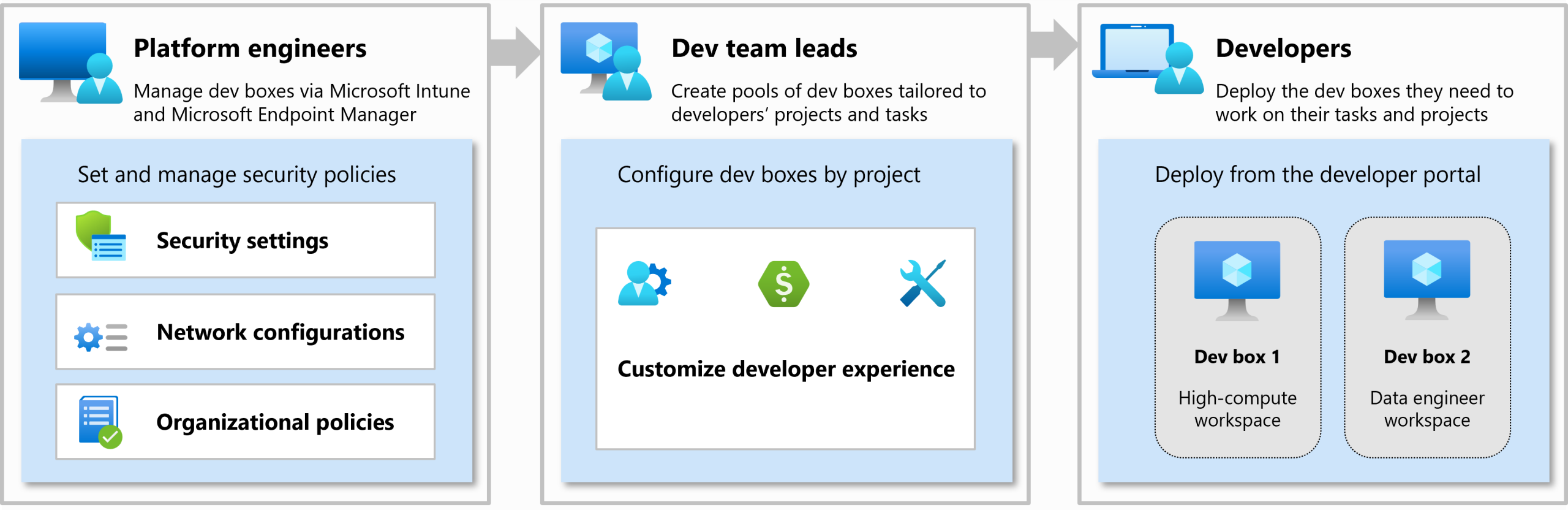
Below is a visual overview of how Microsoft Dev Box fits into your team’s development workflow, supporting platform engineers, dev leads and developers at every stage.
Source: Microsoft
Here are the benefits of using Microsoft Dev Box:
- Fast Developer Onboarding
With preconfigured environments, new developers can begin work within minutes. No need to wait for setup or installations, saving hours or even days. - Work From Anywhere
Teams can access their development environment securely from any device. Whether remote or hybrid, everyone gets the same powerful tools. - No Physical Hardware Needed
Developers don’t need high end machines to work efficiently. Microsoft Dev Box provides scalable cloud based power without local setup. - Streamlined Collaboration
Developers can easily share environments and test code across teams. It helps reduce friction and keeps everyone aligned throughout the project. - Built In Security And Compliance
Your data and development environments stay protected with enterprise grade security features. It also simplifies compliance for regulated industries. - Easier Project Scaling
As your team grows, you can quickly spin up more Dev Boxes. There is no delay due to hardware limitations or inconsistent configurations.
If you are ready to move away from traditional environments, Microsoft Dev Box for cloud based development could be the shift your team needs.
Want to explore setup options or need help getting started? Our experts at TECHOM Systems are here to support you in every step of the way.
Microsoft Dev Box vs Traditional Development Environment
Choosing the right development setup can make a huge difference in how quickly your team delivers results. Traditional development environments often create delays, require physical resources and add unnecessary complexity. In contrast, Microsoft Dev Box for cloud based development services simplify everything. It gives your team a faster, more secure and scalable way to work. Let’s break down the difference between Microsoft Dev Box vs Traditional Development environments:
Traditional Development Environment
- Time consuming setup
Developers often spend hours or even days installing tools, setting up dependencies and troubleshooting environment issues. - Limited scalability
As your team grows, managing and replicating local setups becomes difficult, leading to inconsistency and wasted time. - Physical hardware dependency
High performance development usually needs powerful machines, which adds cost and limits flexibility. - Security risks due to local storage
Data stored on local systems increases the risk of leaks, loss or breaches, especially when devices are lost or stolen.
Microsoft Dev Box For Cloud Based Development Services
- Instant provisioning
Developers can get a ready to code environment in minutes. No waiting, no complex manual setup, just open and start working. - Scalable via the cloud
Easily add new environments or scale resources as your project demands grow. Everything stays fast and consistent. - No need for local machines
Developers can work from any device without relying on heavy local hardware. All computing happens securely in the cloud. - Enterprise grade security
Microsoft Dev Box offers built in security features, including identity access control and data encryption, to keep your code safe.
The difference is clear. Traditional environments slow your progress, while Microsoft Dev Box removes blockers and supports true agility in cloud based development.
If you want to know more about Microsoft Dev Box then Click Here…
Who Needs Microsoft Dev Box Services?
Choosing the right development setup depends on how your team works. If you often onboard new developers, manage remote teams or want a flexible and secure development environment, Microsoft Dev Box can be a great fit. Here are the types of teams and companies that benefit the most:
- Software companies that are growing fast
When your team expands quickly, you need a development setup that is just as fast and reliable. Microsoft Dev Box helps you avoid delays in provisioning and setup. - Enterprises that need consistent environments
Large organizations often face challenges with maintaining identical development setups. With Microsoft Dev Box, every developer can work in a standardized and secure space. - Remote first teams working across locations
Whether your developers work from home or different countries, Microsoft Dev Box gives them access to the same environment from anywhere. - DevOps focused teams using Azure
If your workflow is integrated with Azure and DevOps tools, Dev Box connects smoothly and supports your CI/CD pipeline from the start.
With Microsoft Dev Box, you reduce setup time, improve security and scale easily. It brings a modern approach to how development teams build software.
Want to know if Microsoft Dev Box fits your team’s needs? Talk to TECHOM Systems today for expert guidance tailored to your setup.

Choose TECHOM Systems For Microsoft Dev Box
Choosing the right partner to set up your Microsoft Dev Box can make all the difference. At TECHOM Systems, we bring experience, clarity and hands on support to every setup. Whether you’re moving your development to the cloud for the first time or looking to streamline your workflow, our team ensures a smooth and tailored experience. Here is how TECHOM Systems helps you get the most out of your Microsoft Dev Box setup:
- Expert Setup and Configuration
Our team configures your Microsoft Dev Box environment to match your development needs. From network settings to access control, we make sure your dev box is ready for real world use. - Personalized Integration Support
We help integrate your existing tools, repositories and workflows. Whether you use GitHub, Azure DevOps or custom frameworks, we make it all work together seamlessly. - Ongoing Optimization and Support
TECHOM Systems doesn’t just set things up. We stay involved with ongoing tuning, updates and support to keep your Dev Box performing at its best. - Developer Onboarding Made Easy
New team members can get started fast. We create easy to use templates and secure policies that help onboard developers quickly without errors or delays. - Secure and Scalable Infrastructure
Our Dev Box setup uses Microsoft’s security best practices. We also assist with Azure Active Directory security audit to ensure that access controls are tight, identities are protected and compliance is maintained. You get a reliable, scalable environment where data protection is built into every step.
Want a secure and developer ready Microsoft Dev Box setup tailored to your business needs? Contact TECHOM Systems today and let’s get started.
Frequently Asked Questions (FAQs)
#1: What Is A Dev Box In Azure?
A Dev Box in Azure is a preconfigured, cloud based development environment that helps developers start coding instantly without manual setup.
#2: What Is Microsoft’s Platform For Cloud Based Applications?
Microsoft Azure is the primary cloud platform offering tools and services to build, deploy and manage cloud based applications efficiently.
#3: What Is The Difference Between Microsoft Dev Box And Azure Virtual Desktop?
Microsoft Dev Box is for developers with prebuilt tools and code environments, while Azure Virtual Desktop is a general purpose virtual machine for remote desktops.
#4: Is The Microsoft Dev Box Worth It?
Yes, Microsoft Dev Box for cloud based development is worth it if your team wants to speed up onboarding, reduce setup time and enhance coding efficiency securely.
#5: Why Choose TECHOM Systems For Microsoft Dev Box Setup?
TECHOM Systems makes Microsoft Dev Box setup easy with fast deployment, seamless integration and expert support tailored for your development needs.
Conclusion
In this blog, you might have explored how Microsoft Dev Box for cloud based development removes setup delays, enhances project speed and ensures security through flexible, cloud powered environments. You also discovered how TECHOM Systems simplifies the setup, integration and long term support process so your team can focus on building, not configuring. Now is the time to make development easier and smarter.
Ready To Transform Your Dev Workflow?
Contact TECHOM Systems now and see what’s possible when the right tools meet the right team.


Peter Pawlak, Director of Sales and Customer Advocate, brings over 15 years of experience helping ambitious business owners grow with confidence. His mission is to empower people to start, build, and run their businesses successfully, turning ideas into thriving ventures. Peter’s passion for business transformation and his results-driven approach have been key to guiding entrepreneurs toward faster and smarter growth.