
Keeping business data safe has become a constant challenge as cyber threats continue to evolve. Many companies find it difficult to protect sensitive information when employees work remotely or use personal devices for business tasks. Without a strong device management system, the risk of data leaks, unauthorized access and compliance issues increase significantly.
Our Microsoft Intune deployment services offer a secure and reliable way to manage devices, applications and data from a single platform. With proper deployment, businesses can safeguard their assets, enforce security policies and maintain control across all devices, whether they are company owned or personally owned.
This approach not only strengthens security but also ensures a seamless experience for employees, allowing them to work efficiently without compromising data protection.
Ready to enhance your business security? Book a free consultation with TECHOM Systems today. Click the button below to get started and see how our Microsoft Intune deployment services can transform your business security.

What is Intune Deployment and How Does It Work?
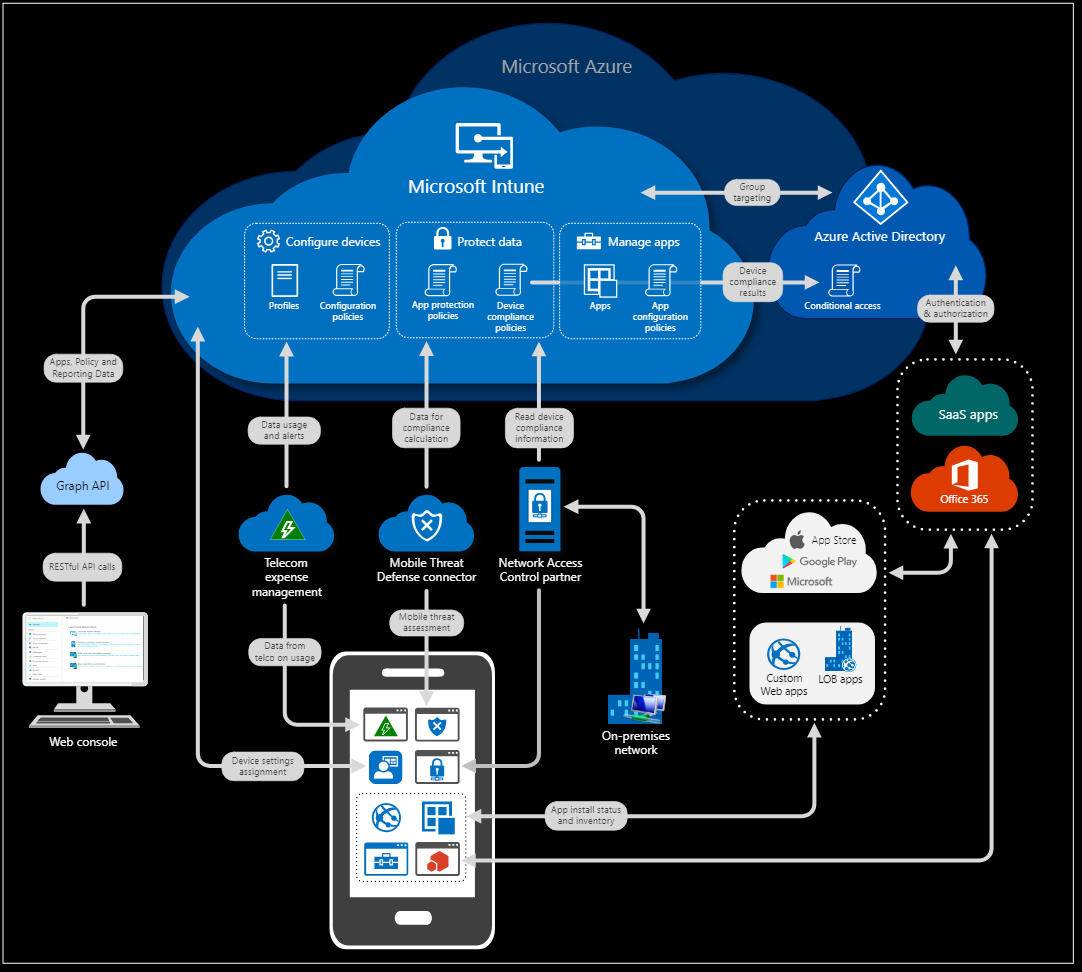
When a company needs to manage devices, applications and security policies from one central place, Microsoft Intune deployment services become an important part of the process. Microsoft Intune helps organizations set up, configure and maintain devices across different platforms, making sure they remain secure and up to date. Understanding how Intune deployment works can make the setup process smoother and help teams get the most out of the platform. Here are the main points you should know about Intune deployment:
1. Device Enrollment
The first step in Intune deployment is enrolling devices. This involves connecting company owned or personal devices to the Intune platform so they can be managed. Once enrolled, IT admins can push updates, policies and apps directly to these devices.
2. Policy Configuration
After devices are enrolled, security and compliance policies are created. These policies help protect company data by controlling how devices are used and what data they can access.
3. Application Deployment
Intune allows businesses to install, update and remove applications remotely. This ensures every team member has the right tools without manually installing software on each device.
4. Security Management
Through Intune, IT teams can monitor threats, enforce encryption and manage passwords to keep devices secure. This helps reduce the risk of data breaches and unauthorized access.
5. Ongoing Monitoring and Updates
Once deployed, Intune continues to monitor devices, apply patches and update policies automatically. This makes device management easier and more efficient for IT teams.
By following these steps, businesses can ensure their Intune deployment is effective, secure and aligned with their needs.
Key Features Of Microsoft Intune That Enhance Security
Managing devices and protecting data is more effective when you use a platform that offers built in security tools. The features of Microsoft Intune are designed to help organizations maintain control, reduce risks and respond quickly to potential threats. With the right setup, these tools can protect both company owned and personal devices used for work. Some of the key features of Microsoft Intune include:
- Conditional access policies that restrict access to sensitive data based on user identity, device status and compliance levels
- Remote wipe and lock to protect information on lost or stolen devices
- App protection policies that control how data is shared and used within applications
- Endpoint compliance monitoring that performs real time security checks to ensure devices meet organizational standards
These features of Microsoft Intune give your organization the capability to maintain strong security across all endpoints while supporting productivity in a constantly evolving digital environment.
Step By Step Microsoft Intune Deployment Guide
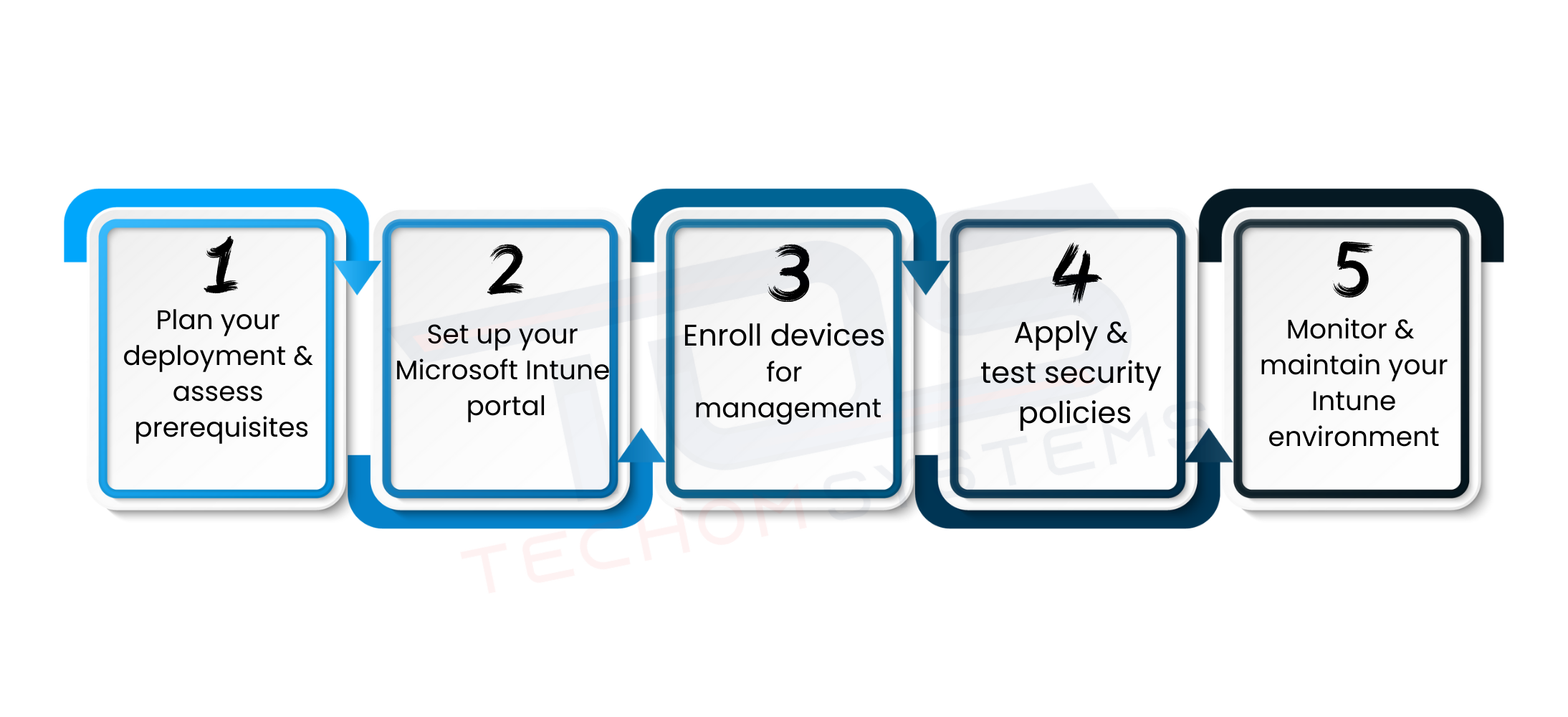
Deploying Microsoft Intune can seem complex, but following a structured approach ensures your organization gains maximum security and control over devices. This Microsoft Intune deployment guide provides practical steps and tips to make the process smooth and effective.
#1. Plan Your Deployment and Assess Prerequisites
Start by analyzing your business needs and device landscape. Identify which devices are company owned and which are personal. Check licensing requirements, network readiness and existing security policies. Proper planning saves time and prevents configuration mistakes later.
#2. Set Up Your Microsoft Intune Portal
Access the Microsoft Endpoint Manager admin center to configure your environment. Add users, assign licenses and set up basic device groups. Organizing users and devices from the beginning makes ongoing management easier and more efficient.
#3. Enroll Devices for Management
Register all devices, including Windows, macOS, iOS and Android devices, into Intune. For personal devices, use BYOD policies to ensure company data is protected while respecting user privacy. Device enrollment is the foundation for monitoring and policy enforcement.
#4. Apply and Test Security Policies
Create conditional access rules, compliance standards, app protection and encryption policies. Test policies on a small pilot group before full deployment. This helps catch potential issues and ensures employees can work without interruptions.
#5. Monitor and Maintain Your Intune Environment
Regularly review device compliance, security alerts and system reports. Use real time monitoring to identify vulnerabilities and make adjustments quickly. Continuous maintenance keeps your IT environment secure and up to date.
Extra Tips
- Provide training sessions for employees on enrolling devices and following security policies.
- Automate updates and app deployments to reduce manual work for IT teams.
- Use reports to track policy compliance and device health regularly.
- Keep communication clear so users understand the importance of following security rules.
Ready to simplify device management and boost security? Book a free consultation with TECHOM Systems today and find out how our Microsoft Intune deployment services can help protect your business and streamline IT operations. Click the button below to get started.
Best Practices For Microsoft Intune Configuration in Deployment Services
Getting the most out of Microsoft Intune deployment services requires careful planning and proper configuration. Following proven configuration best practices helps your organization maintain security, reduce risks and make device management more efficient. These steps ensure that your Intune environment is reliable and easy to manage.
Key Microsoft Intune configuration best practices include:
- Define clear security policies before deployment
Identify your organization’s security requirements and create policies that control access, data usage and device compliance. Clear policies prevent confusion and help maintain consistent protection across all devices. - Use role based access control
Limit administrative rights based on roles to ensure only authorized personnel can make changes. This reduces the risk of accidental misconfigurations and strengthens overall security. - Test policies on a small group of devices
Before applying policies organization wide, run a pilot test on a few devices. Testing helps identify potential issues, ensures compatibility and allows adjustments before full deployment.
By following these Microsoft Intune configuration best practices, your organization can achieve a secure, efficient and well managed device environment, making the most of your Microsoft Intune deployment services.
Benefits Of Microsoft Intune Deployment For Security

Implementing Microsoft Intune deployment services brings more than just device management. It provides organizations with tools to protect data, improve efficiency and maintain control over all endpoints. Understanding the key benefits helps businesses see why Intune is an essential part of modern IT management.
Key benefits of Microsoft Intune deployment for security include:
- Enhanced Data Protection
Intune helps secure company data across all devices, whether they are company owned or personal. Policies like conditional access, encryption and app protection ensure sensitive information stays safe. - Reduced IT Overhead
Centralized management and automation reduce the workload for IT teams. Updates, patches and policy enforcement can be handled remotely, saving time and effort. - Centralized Device Management
Manage Windows, macOS, iOS and Android devices from a single dashboard. This gives IT teams full visibility and control over endpoints, making compliance monitoring easier. - Consistent User Experience
Employees get a smooth and secure experience across all devices. Proper configuration and management ensure they can work efficiently without disruptions. - Proactive Threat Detection and Response
Intune integrates with Microsoft Defender and other security tools to identify potential threats in real time. IT teams can quickly respond to security incidents, block compromised devices and prevent data breaches before they escalate.
By leveraging these benefits organizations can strengthen their security posture, simplify IT operations and provide employees with a reliable and secure work environment.
Microsoft Intune vs Other MDM Solutions
Evaluating MDM solutions can be challenging without a clear comparison. The table below demonstrates the key differences between Microsoft Intune vs other MDM solutions, helping businesses understand why Intune is a preferred choice for security, efficiency and seamless device management:
| Feature | Microsoft Intune | Other MDM Solutions |
|---|---|---|
| Integration | Seamless integration with Microsoft 365 for managing devices, apps and user access | May not integrate fully with Microsoft 365, requiring additional setup |
| Security | Advanced security features like conditional access, app protection and endpoint compliance monitoring | Basic security features may lack advanced policy enforcement |
| Scalability | Can manage from a few devices to thousands, suitable for businesses of all sizes | Limited scalability may require additional infrastructure for large deployments |
| Management | Centralized device management from a single dashboard | Often requires multiple tools or consoles to manage all devices |
| Compliance | Built in tools to meet organizational and regulatory compliance standards | Compliance tools may be limited or require third party solutions |
| User Experience | Consistent and seamless experience across all devices | Experience may vary depending on the solution and device type |
Microsoft Intune deployment services offer more than just basic device management. Its deep integration with Microsoft 365, advanced security policies and compliance tools make it a strategic choice for businesses looking to simplify IT operations while maintaining high security standards. Choosing Intune means fewer management headaches, stronger protection against data breaches and a consistent experience for all employees.
If you want to know more about Microsoft Intune Deployment Services then Click Here…
How TECHOM Systems Delivers Expert Microsoft Intune Deployment Services
Implementing Microsoft Intune deployment services effectively requires expertise, planning and ongoing support. TECHOM Systems helps businesses deploy, configure and manage Intune to secure devices, applications and data while providing a seamless experience for employees. Our approach focuses on maximizing security, efficiency and compliance across all endpoints. Here is how we deliver our services:
#1. Manage Applications with MAM
With Mobile Application Management, TECHOM Systems secures application level data access. We deploy policies that prevent data transfer from corporate apps to personal storage, keeping sensitive information safe even on BYOD devices.
#2. Manage Devices with MDM
Our Microsoft Intune consultant services help businesses set up Mobile Device Management using a proven windows autopilot deployment guide. These Intune managed services provide IT administrators with the tools to manage assets, enforce configurations and secure endpoints across the enterprise.
#3. Microsoft Endpoint Manager and Security
We manage devices using Microsoft Intune and Azure Active Directory Security Audit for client apps. Our team ensures strong endpoint protection with Microsoft Defender ATP, disk encryption, firewalls, endpoint detection and more.
#4. Conditional Access and Compliance Policies
We set up conditional access rules to control how and when users can access company resources. Compliance policies are enforced to make sure all devices meet organizational and regulatory standards.
#5. Automated Updates and Patch Management
TECHOM Systems configures automated updates for devices and applications, ensuring that security patches are applied promptly without interrupting user productivity.
#6. Reporting and Analytics
Our team provides detailed reports on device health, compliance status and security incidents. These insights allow IT teams to make informed decisions and proactively address potential threats.
#7. User Training and Support
We provide training and ongoing support to employees for smooth adoption of Microsoft Intune deployment services. This ensures users understand security policies and can work efficiently on all managed devices.
Ready to strengthen your business security and streamline device management? Learn more about Intune as a service pricing and book a free consultation with TECHOM Systems today to see how our Microsoft Intune deployment services can protect your organization while improving productivity.
Frequently Asked Questions
#1: What Is Microsoft Intune Deployment?
Ans: Microsoft Intune deployment is the process of setting up devices and applications in a secure environment, allowing IT teams to manage, monitor and protect endpoints efficiently using Intune design as a service.
#2: What Is The Difference Between Windows Deployment Services And Intune?
Ans: Windows Deployment Services installs Windows OS on devices, while Microsoft Intune manages devices, apps and security remotely. Intune as a service offers cloud based device control beyond just OS deployment.
#3: What Is The Intune Service Used For?
Ans: Microsoft Intune service is used to secure devices, manage applications, enforce policies and monitor compliance across a workforce. TECHOM Systems often leverages Intune as a service for modern IT management.
Final Thoughts
In this blog, we explored how Microsoft Intune deployment services help businesses secure sensitive data, manage devices efficiently and enforce consistent security policies across all endpoints. By managing applications with MAM, configuring devices with MDM, applying conditional access and using reporting and analytics, Intune deployment services provide a complete solution for modern IT management.
Are You Ready To Take The Next Step Toward A Secure And Efficient IT Environment?
Contact TECHOM Systems today and book a free consultation to see how our Microsoft Intune deployment services can transform your digital workplace.

Joe thrives at the intersection of technology and team productivity. With 8+ years in IT operations, cloud infrastructure and modern-driven process improvement, she excels at transforming complex systems into organized, manageable workflows. Joe’s real strength lies in helping teams make sense of technical environments, clarifying cloud deployments, streamlining IT processes and ensuring AI tools are applied effectively. Her approachable guidance and structured communication reduce confusion, boost collaboration and make technical innovation feel achievable. Joe believes technology works best when it empowers people, not complicates their work.