
Micro Summary: Microsoft Endpoint Manager helps organisations manage, secure and optimise devices from a single platform. This supports hybrid work, reduces endpoint risk and simplify device operations across Windows, macOS, iOS android and cloud environments.
Key Insights:
- Endpoint Manager centralises endpoint control using Microsoft Intune and modern management principles.
- Intune device management enables cloud‑first, identity‑driven control without reliance on on‑prem networks.
- Device management with Intune supports corporate‑owned and BYOD scenarios with flexible security controls.
- Organisations can modernise Windows management gradually using co‑management.
- Expert guidance through an Intune consulting service Australia organisations trust reduces rollout risk and speeds adoption.
While reviewing these insights, you can connect with us whenever you are ready to discuss your endpoint management challenges.

What Is Microsoft Endpoint Management?
If your organisation is licensed for Microsoft 365, you already have access to Microsoft Endpoint Manager, the unified platform that brings Microsoft Intune and Configuration Manager together to help secure and manage your entire device ecosystem. For many businesses, this is the starting point for modern endpoint management. So what comes next?
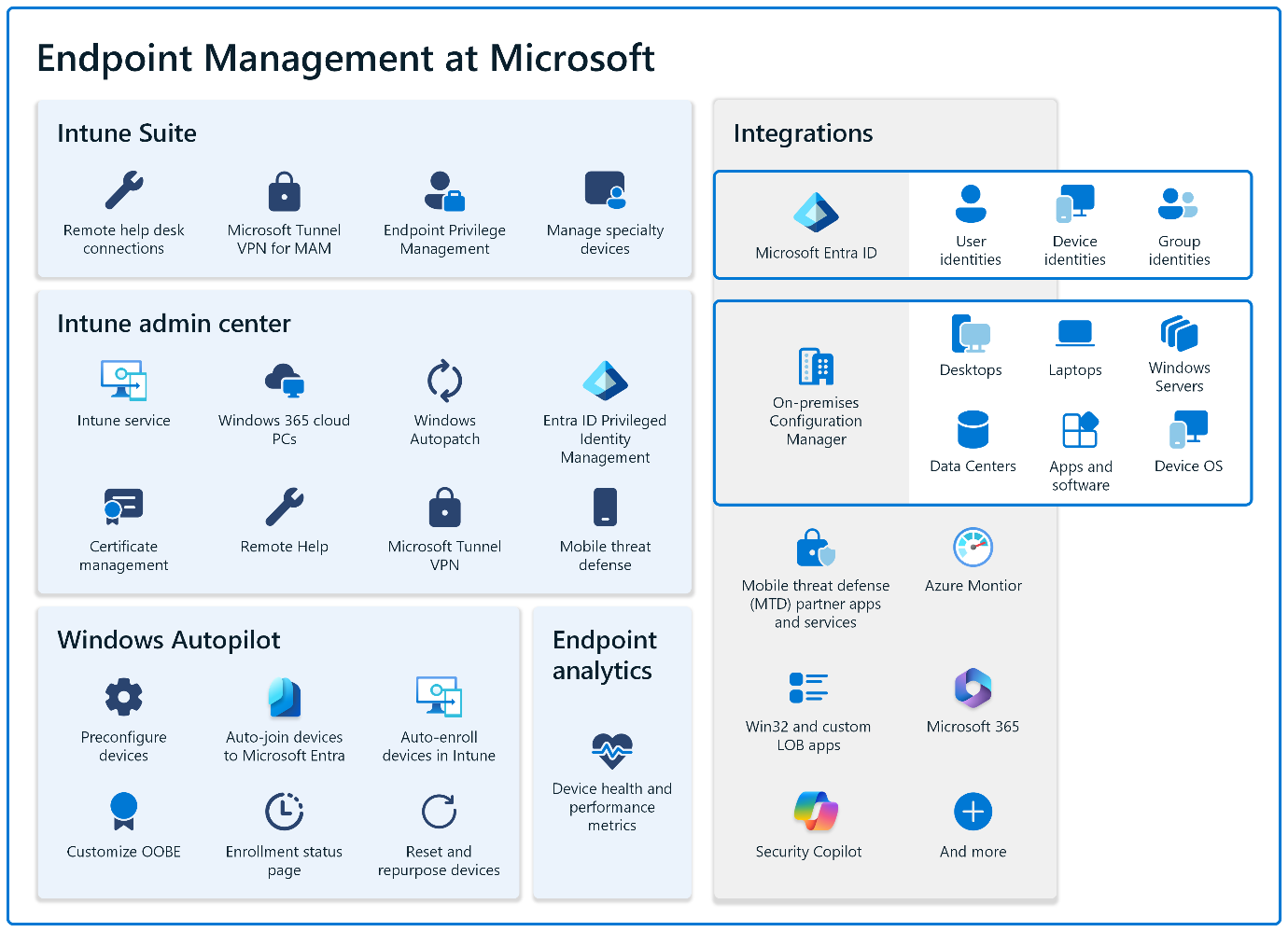
To understand the value of Endpoint Manager, it helps to look at how Intune reshapes device and application management for modern workforce.
Why Modern IT Needs a New Management Model
Traditional endpoint management worked well when-
- Users were in the office
- Devices were joined to the corporate domain
- Applications were installed and controlled on‑premises
- Security relied on a well‑defined network perimeter
Modern workplace is mobile, hybrid, and cloud-driven. Users access corporate data from multiple networks, devices rarely sit behind the firewall, and applications increasingly live in SaaS environments. Cyber threats now target endpoints directly, making device health and identity protection more important than ever.
In this environment, IT teams need a management solution that is-
- Cloud-ready and not dependent on corporate networks
- Identity-driven, not perimeter-driven
- Consistent across operating systems
- Secure, without creating user frustration
This is precisely where Microsoft’s Intune-led architecture becomes essential.
Why endpoint management is now a business priority
Endpoint management now directly affects security posture, compliance readiness, onboarding speed and employee productivity. Hybrid work has removed the traditional perimeter. Devices may never connect to the corporate network, yet still require secure access to business systems. Endpoints are also a growing security target. Without consistent policies and visibility, unmanaged or misconfigured devices introduce real risk.
At the same time, IT teams are under pressure to reduce complexity. Managing multiple endpoint tools leads to gaps, duplicated effort and inconsistent enforcement. Endpoint Manager Microsoft addresses this by consolidating device, app and security management into a single operating model.
Intune Device Management at the core
The foundation of Microsoft Endpoint Manager is Intune device management.
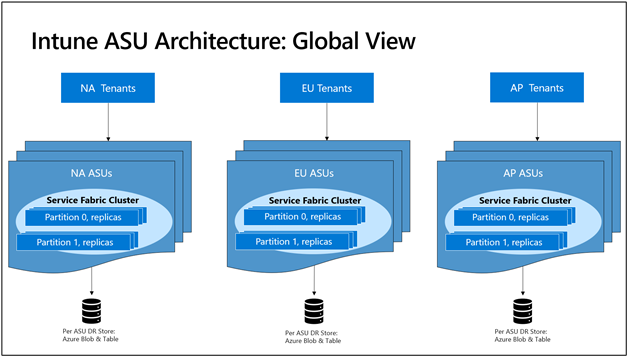
Microsoft Intune provides cloud‑native management across platforms, allowing IT teams to enrol devices, apply policies, deploy applications and protect corporate data, regardless of location. With device management with Intune, organisations can standardise configurations, enforce security baselines and manage applications without maintaining on‑prem infrastructure. This makes it ideal for hybrid and remote‑first environments.
For many organisations, Intune becomes the engine that drives consistent, scalable endpoint operations.
Did You Know?
- Microsoft Endpoint Management is API‑driven, which makes automation and integration easier as environments mature.
- Intune device management works closely with identity and access controls to enable smarter, risk‑based decisions.
- App‑level data protection allows secure BYOD without managing the entire device.
Getting Device Enrollment Right from day one
Enrollment sets the tone for everything that follows. Once a device is enrolled into Microsoft Endpoint Manager, it can receive policies, applications, compliance checks and security controls automatically. Poor enrollment design creates friction, resistance and support tickets. Good enrollment feels almost invisible.
A practical enrollment strategy typically includes-
- Corporate‑owned Windows devices provisioned with minimal IT touch
- BYOD mobile devices enrolled with privacy‑respecting controls
- Apple and Android devices aligned to platform‑specific best practices
At TECHOM Systems, enrollment is treated as a user experience project as much as a technical one. When users understand the process and feel minimal disruption, adoption increases dramatically.
If you see solutions that fit your needs as you read, get in touch with us for a personalised consultation.
Configuration profiles that enforce standards
Configuration profiles are how organisational standards are applied consistently.
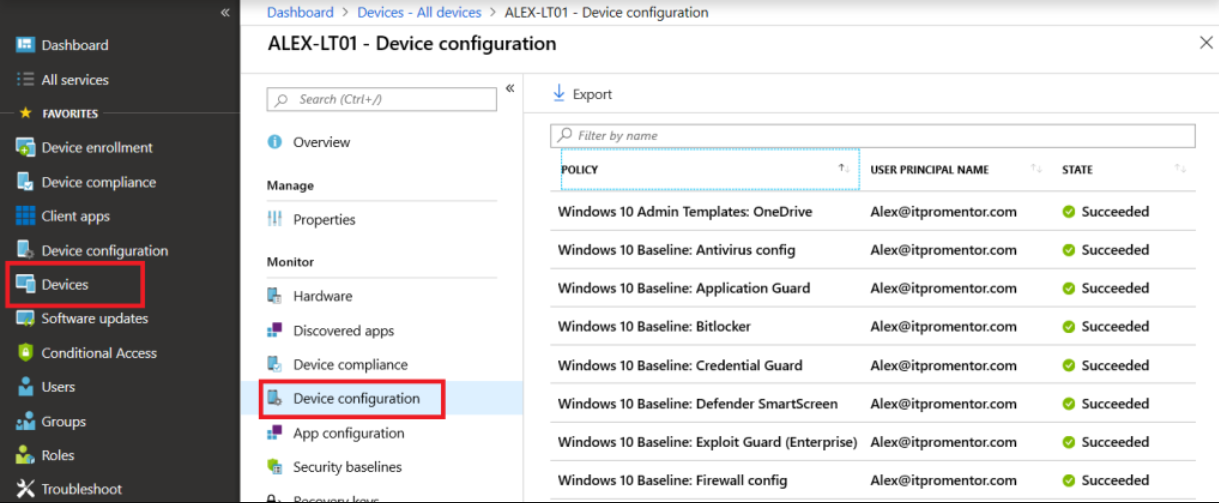
Using Microsoft Endpoint Manager, IT teams define profiles that control security settings, authentication rules, connectivity and device behaviour. These profiles are automatically assigned to the right users or devices, removing manual configuration and drift.
A disciplined baseline‑first approach ensures stability while allowing role‑based policies to be layered over time.
Compliance that shapes access decisions
Compliance policies define what a trusted device looks like. With Microsoft Endpoint Manager, compliance status can be used to control access to applications and data. Devices that meet security requirements gain access, while non‑compliant devices can be restricted or guided through remediation.
This creates a smarter security model where access adapts to risk instead of relying on static rules.
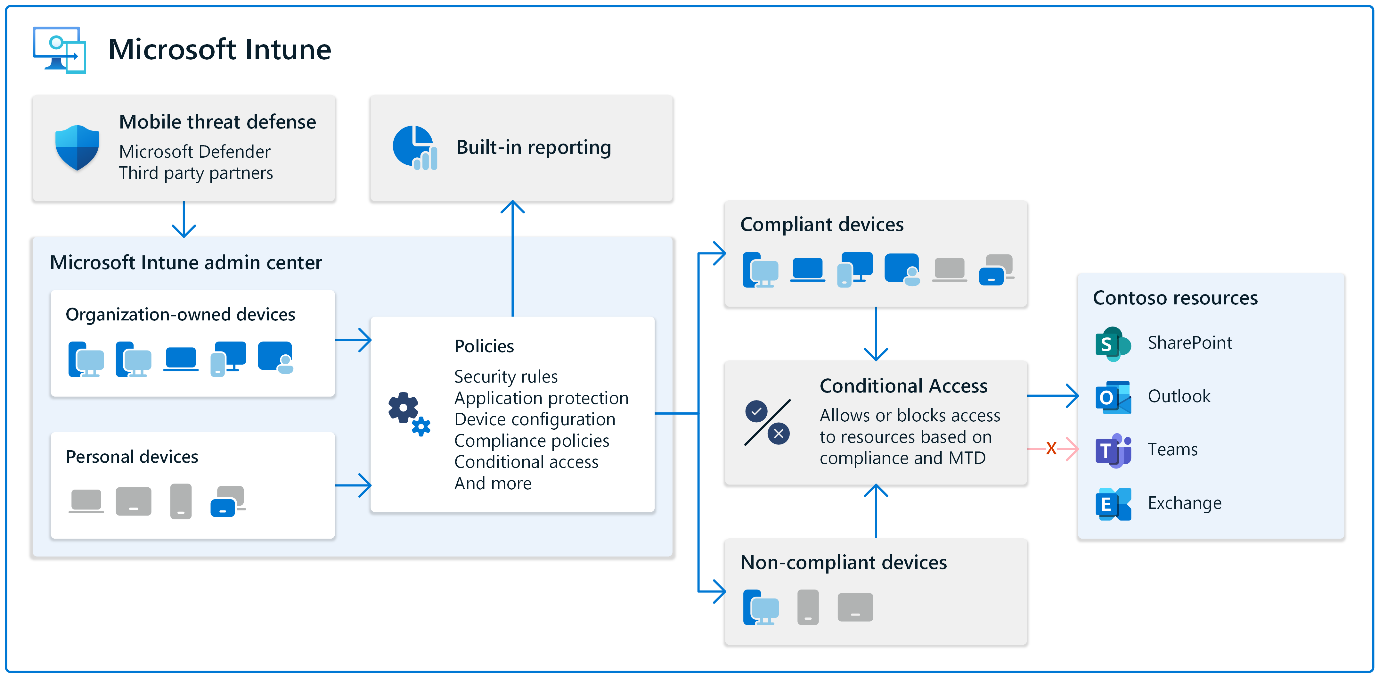
Application management without complexity
Applications are where work happens and where data risk lives. Microsoft Endpoint Manager allows IT teams to deploy and manage applications across platforms, ensuring users always have access to approved tools.
Beyond deployment, application protection policies secure corporate data inside applications, even on personal devices. This makes BYOD practical without compromising data security.
Co‑management for controlled modernisation
Not every organisation can move entirely to cloud management overnight. Co‑management allows Windows devices to be managed by both Configuration Manager and Intune at the same time. This enables IT teams to modernise gradually, moving workloads to Intune when ready while keeping critical operations stable.
This phased approach reduces risk and supports long‑term transformation.
Insight‑driven improvement with analytics
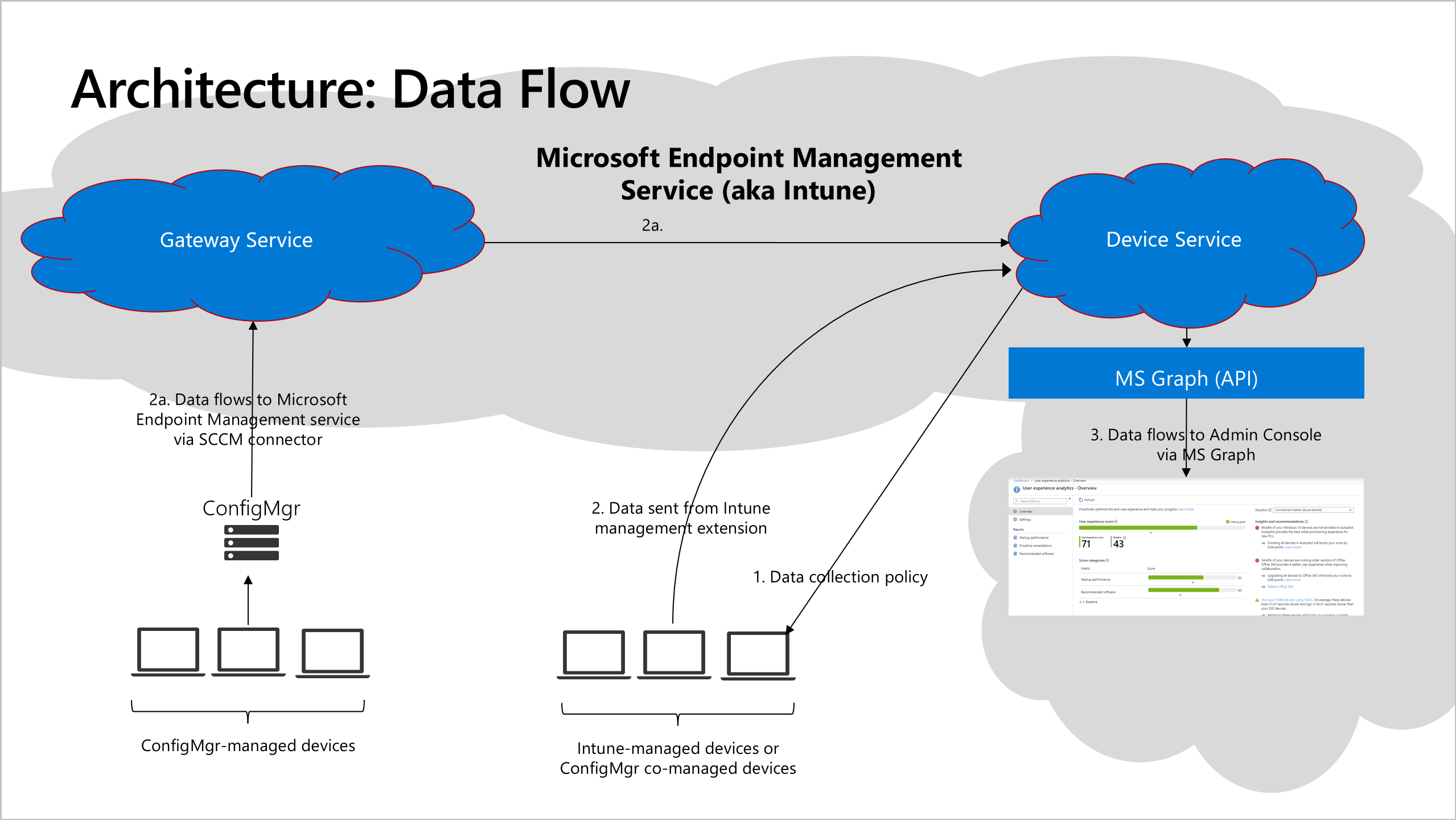
Endpoint analytics provides visibility into device performance and user experience. Instead of guessing why productivity drops or support tickets rise, IT teams can identify trends, prioritise fixes and track improvements over time. This turns endpoint management into a continuous improvement cycle rather than reactive support.
What Should You Know?
- A successful Microsoft Endpoint Manager rollout depends on planning, governance and phased execution, not just tools.
- Intune device management works best when enrollment, compliance and app strategy are aligned.
- TECHOM Systems provides an end‑to‑end Intune consulting service Australia organisations rely on for design, deployment and optimisation, helping teams move faster with fewer risks.
Intune and Endpoint Manager Consulting for Australian Enterprises
Many endpoint initiatives struggle due to rushed rollouts, unclear ownership models and lack of operational planning. The technology is rarely the issue.
An experienced Intune consulting service Australia organisations can depend on helps bridge the gap between strategy and execution, ensuring endpoint management delivers real, measurable outcomes.
TECHOM Systems delivers end‑to‑end support through-
- Readiness assessments and modern architecture planning
- Intune and Microsoft Endpoint Manager deployment services
- Security baseline implementation and compliance alignment
- Co‑management design and structured rollout plans
- Ongoing optimisation, governance, and operational support
Frequently Asked Questions
#1. How does Intune support modern device management for Australian organisations?
Intune for Device Management gives Australian businesses a cloud‑first way to secure laptops, mobiles and tablets without relying on traditional on‑prem tools. With Intune for Device Management, organisations can apply consistent policies across Windows, macOS, iOS and Android while supporting hybrid work and flexible workforce models. TECHOM Systems helps businesses adopt these capabilities through structured planning, ensuring configurations align with operational and compliance needs.
#2. What is the Intune Deployment Service and why is it valuable?
The Intune Deployment Service provides a guided, modern approach for rolling out Intune across corporate and BYOD devices. Using the Intune Deployment Service, organisations can simplify onboarding, reduce manual effort and ensure users get a seamless setup experience. TECHOM Systems delivers a proven deployment framework that helps Australian businesses transition smoothly from legacy tools to a modern endpoint environment.
#3. What do Australian businesses need to consider about Intune Pricing in Australia?
Intune Pricing in Australia is typically bundled within Microsoft 365 plans or purchased as an add‑on licence, depending on organisational needs. Since Intune Pricing in Australia varies across business tiers, TECHOM Systems helps organisations choose the right licensing structure—avoiding unnecessary overspend while ensuring all required features and security controls are included.
#4. How does Intune as a Service benefit ongoing operation?
Intune as a Service provides continuous management, update handling and configuration oversight without internal IT teams needing to manage every detail. With Intune as a Service, Australian businesses get ongoing support, policy optimisation and proactive monitoring. TECHOM Systems offers a managed service model that keeps endpoint environments secure, compliant and well‑maintained over time.
#5. Why is Microsoft Endpoint Manager important for Aussie business today?
Microsoft Endpoint Manager for Aussie Business offers a unified way to manage devices, applications and security across diverse environments. As hybrid work expands, Microsoft Endpoint Manager for Aussie Business helps organisations maintain consistent controls while reducing operational complexity. TECHOM Systems assists companies across Australia with planning, deployment and long‑term optimisation to ensure the platform delivers maximum value.
You have gone through this blog and now it’s time to enhance your environment with Microsoft Intune.
Enterprise Closing Insights
Microsoft Endpoint Manager is more than a management tool. It is a modern framework for securing devices, protecting data and supporting flexible work without unnecessary complexity.
When implemented with the right strategy and expertise, it becomes a long‑term enabler for secure, scalable IT operations. If your organisation is ready to strengthen endpoint security, simplify device management and support modern workstyles, Microsoft Endpoint Manager provides the foundation and TECHOM Systems can help you get there.
Ready to take the next step
TECHOM Systems delivers trusted Intune consulting service Australia organisations use to modernise endpoint management with confidence.
Get in touch with TECHOM Systems to kick‑start your Microsoft Endpoint Manager deployment.
- Drop your Inquiry: Contact Us
- Call us: 1800 TOSNOW (1800 867 669)
- Email Us: hello@techomsystems.com.au
Your journey toward smarter, simplified device management starts with one conversation. We are here when you are ready.

A content strategist and IT writer with over 7 Years of experience simplifying complex tech concepts into clear, actionable insights. Specialising in cloud computing, cybersecurity and enterprise IT trends, he crafts content that bridges the gap between technical depth and business value. Helping businesses thrive with practical guidance, Pradeep talks about facts, is keen to share knowledge, and always puts the community first. Outside of work, he enjoys exploring open-source projects and mentoring aspiring IT professionals, reflecting his passion for continuous learning and community growth.