


Summary:
The Intune company portal empowers businesses to manage, secure and monitor devices efficiently. It simplifies IT administration through centralized control, policy enforcement and seamless access to corporate apps. The blog explores how Intune works, its setup process, real-world business benefits and why connecting with TECHOM Systems ensures a smooth and successful deployment. Whether managing corporate or personal devices, Intune delivers flexibility, compliance and control—helping businesses stay secure and productive in the modern environment.
Key Insights:
The Intune Company Portal simplifies device management by giving IT teams centralized control over security, apps and access across all devices.
Businesses can securely manage both corporate and personal devices while maintaining employee privacy and flexibility.
Automated policy enforcement, compliance checks and remote actions help reduce security risks and manual IT workload.
Seamless integration with Microsoft 365 and Azure Active Directory ensures smoother workflows and stronger access control.
Connecting with TECHOM Systems ensures expert deployment, ongoing support and maximum value from your Intune investment.
Have you ever found yourself frustrated while juggling multiple devices just to keep your company data secure? Maybe you have also wondered how IT teams manage hundreds of laptops, smartphones and tablets without everything turning into complete chaos. I found myself asking the same questions while exploring different tools and approaches to device management.
After spending time understanding the challenges businesses face and testing a few solutions, I discovered that the Intune Company Portal truly stands out. It simplifies device management, strengthens security and at the same time helps employees stay productive without causing constant interruptions.
In this blog, we are going to explore about Intune, how it works and why it might be the perfect fit for your business.
Understanding Intune Company Portal
When users first access the Intune Company Portal, one of the most noticeable aspects is how intuitive and easy to navigate it is. At its core, it acts as a centralized platform that allows organizations to manage devices, enforce security policies and control access to company resources. For employees, it serves as a secure gateway to company apps and files. For IT administrators, it becomes a reliable way to maintain compliance and protect data across all managed devices.
What sets Intune apart is the balance it maintains between strong security and everyday flexibility. Unlike traditional device management systems that often feel restrictive, Intune supports a smooth work experience for employees, whether they are in the office or working remotely. This approach helps reduce day-to-day friction for users while also easing the operational load on IT teams.
Another strong advantage is its seamless integration with Microsoft 365 and Azure Active Directory. With this connectivity, managing users, devices and applications becomes far more streamlined, removing the need to switch between multiple systems just to maintain security and control.
How Microsoft Intune Manages and Secures Devices?

Microsoft Intune works as a cloud based device and application management system that helps businesses control access, enforce security and keep every endpoint compliant. Instead of relying on manual processes, Intune automates most device management tasks through a single centralized dashboard. With the support of Microsoft Intune deployment services, organizations can roll out secure configurations faster and reduce the risk of mismanagement.
Here is how the core working process flows inside a business environment:
1. Secure Device Onboarding
Employees can easily connect their laptops, mobiles or tablets through a guided setup process. Once a device is enrolled, it automatically becomes part of the company’s managed network.
2. Centralized Security Policy Control
IT teams can define rules for passwords, data encryption, device restrictions and access conditions. These policies apply automatically to all enrolled devices, ensuring uniform security across the organization.
3. Controlled App Distribution
Business critical applications can be installed, updated or removed remotely. This helps maintain consistency across devices and removes the need for manual software handling.
4. Continuous Compliance Checks
Intune constantly evaluates each device against company security standards. If a device falls out of compliance, access to company systems can be restricted instantly to prevent data risks.
5. Performance Reporting and Visibility
Detailed dashboards provide insights into device health, user access, security status and application usage. These reports help IT teams take faster decisions and plan future upgrades more effectively.
Understanding how Microsoft Intune functions makes it clear that it is not only a security tool. It also plays a key role in creating a smooth, structured and secure digital workplace for modern businesses.
Did You Know?
Here are some interesting facts I discovered about Intune that might surprise you:
- Microsoft Intune supports cross-platform management, including Windows, iOS, android and macOS.
- Devices can be remotely wiped if lost or stolen, protecting sensitive data instantly.
- You can deploy software updates automatically, reducing downtime and patching risks.
- Intune’s analytics dashboards help IT teams identify trends and prevent potential security incidents.
These facts highlight why Intune is more than just a device management solution, it is a smart and proactive way to manage modern IT environments.
Intune Company Portal Setup Made Simple
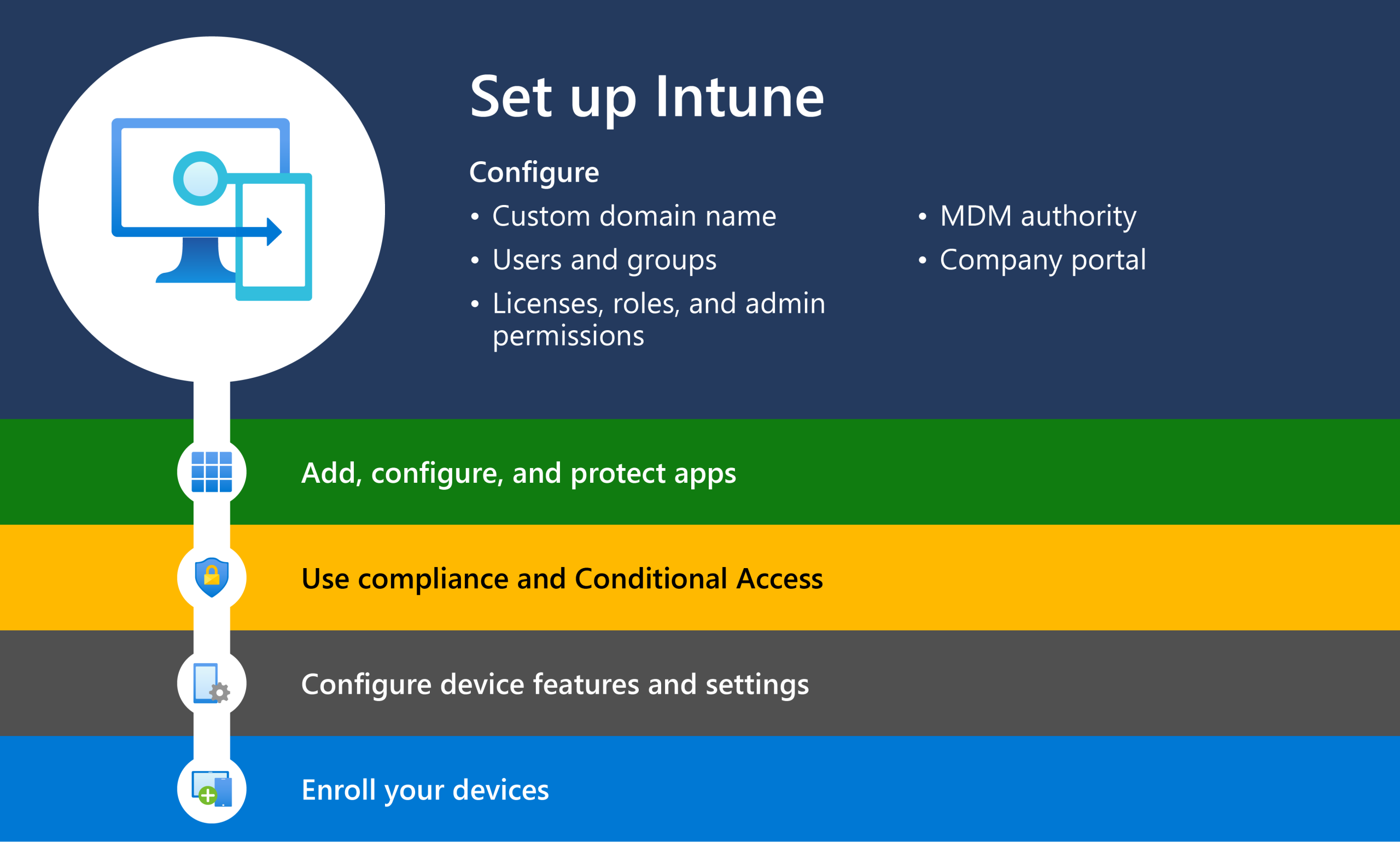
Setting up the Intune Company Portal does not have to feel complicated. When it is done in the right way, the process is smooth, structured and easy for both IT teams and employees. A proper setup ensures devices are secure from day one and users can access company resources without delays.
Here is how the setup process usually flows in a simple and practical way:
1. Access the Intune Admin Center
The process starts inside the Microsoft Endpoint Manager dashboard. This is the central place where administrators control users, devices, apps and security settings. Before moving forward, user roles and permissions are checked to ensure only authorized people can make changes.
2. Start Device Enrollment
Next, devices are connected to the system. Company owned laptops and mobiles can be enrolled automatically, while personal devices can be added through the Intune Company Portal app. Employees simply sign in with their work account and follow a few on screen steps to register their device securely.
3. Apply Security and Compliance Rules
Once devices are enrolled, basic security rules are applied. These include password strength, screen lock timing, data encryption and minimum operating system versions. These rules make sure every device follows the same safety standards and reduces the risk of data leaks.
4. Add and Assign Applications
After security settings are in place, essential business applications are added to Intune. Apps can then be assigned to specific teams or users based on their job roles. This ensures everyone gets access to only what they need, without manual installations or setup delays.
5. Run a Trial Before Full Deployment
Before rolling the setup out across the entire organization, a small test group is selected. This helps confirm that enrollment, policies and app access work properly. Any small issues can be fixed at this stage, avoiding larger disruptions later.
6. Keep an Eye on Devices and Policies
Once everything is live, regular monitoring becomes important. IT teams can check device compliance, security alerts and user access from one dashboard. Policies can also be adjusted over time as business needs change or new devices are added.
A well planned Intune Company Portal setup creates a strong foundation for secure device management. It reduces confusion for users, lowers risks for the business and keeps daily operations running smoothly.
Free Tips For You: Why Businesses Need Endpoint Management With Microsoft Intune
Intune Company Portal On Personal Phone

A common concern I hear is, “Can employees use their personal devices?” Absolutely. In my experience, allowing personal devices is often necessary for remote work and flexibility. Employees can download the Intune company portal on personal phone, enroll their device and access corporate apps securely without giving IT full control over their personal data.
Here’s what I recommend:
- Clear Communication: I always tell employees exactly what IT can see and what remains private.
- Conditional Access: Only devices that meet compliance policies can access company data.
- Seamless App Deployment: Once enrolled, employees can access approved apps immediately.
This approach balances security with user convenience, which is crucial in the hybrid work culture of today.
Key Benefits Of The Intune Device Management Portal

The Intune device management portal offers far more than basic device control. It helps businesses simplify IT operations, strengthen security and support employees in a modern work environment where people use multiple devices every day. Below are some of the most important benefits explained in a clear and practical way:
1. One Central Place to Manage All Devices
Instead of switching between different tools, IT teams can view and manage all company devices from a single dashboard. Laptops, smartphones and tablets can all be tracked in one place, which saves time, reduces manual work and lowers the chances of configuration errors.
2. Stronger Protection for Business Data
Security policies can be applied across every enrolled device, including personal devices used for work. Features like encryption, secure access rules and conditional access help ensure that sensitive business data stays protected, even outside the office network.
3. Better Employee Experience and Productivity
With apps automatically installed and devices configured correctly from the start, employees face fewer technical issues. This means less time spent on troubleshooting and more time focused on daily tasks and business goals.
4. Easy to Scale as the Business Grows
Whether a company manages a few dozen devices or several thousand, Intune adapts easily. New users and devices can be added without changing the core setup, making it a strong long term solution for growing organizations.
5. Smooth Integration with Microsoft Tools
The portal works seamlessly with Microsoft 365 and other Microsoft services. This allows businesses to manage users, apps, emails and access controls in a connected environment, which improves both security and workflow efficiency.
The Intune device management portal supports not only day to day IT operations but also long term digital growth. It gives businesses the control they need while still keeping work simple and flexible for employees.
Reasons Your Business Should Adopt Intune

If you are evaluating whether Intune is the right fit for your organization or not, the value becomes clear when you look at the bigger picture. Intune strengthens security, simplifies IT operations and enables employees to work more efficiently, helping businesses gain stronger returns from their technology investments.
Stronger Protection Against Data Threats: Security rules applied across all devices help minimize the chances of cyber threats, unauthorized access and data leakage.
Lower IT Operational Costs: Automation of routine device and security tasks reduces the burden on IT teams and helps control long-term support expenses.
Secure Work From Anywhere: Employees gain the freedom to work remotely without compromising business data, leading to higher efficiency and better work satisfaction.
Simplified Compliance Management: Built-in compliance controls make it easier to follow regulatory requirements and industry standards without added complexity.
Scalable and Future-Ready IT Setup: Cloud-based management ensures businesses can grow smoothly while staying ready to adopt new technologies.
For any business comparing solutions, Intune stands out by improving security, reducing management effort and supporting modern work environments.
What Should I Do Now?
If you are thinking, “I want to implement Intune for my business, but I do not know where to start,” here’s my advice:
- Evaluate Your Devices: Make a list of all company-owned and personal devices in use.
- Set Priorities: Decide which apps and policies are most critical for your organization.
- Plan Enrollment: Consider whether you’ll roll out in phases or all at once.
- Reach Out for Support: If you want expert guidance, I highly recommend contacting TECHOM Systems at hello@techomsystems.com.au. They can guide you through setup, training and ongoing support.
- Start Small: Enroll a pilot group first, monitor compliance and adjust policies before a full rollout.
Taking these steps ensures a smooth implementation and helps you maximize the benefits of Intune from day one.
Prefer TECHOM Systems For Microsoft Intune Services
Selecting the right service provider for Microsoft Intune can make all the difference in ensuring smooth implementation and ongoing management. TECHOM Systems stands out for several reasons:
- Expert Guidance: From setting up the Intune company portal to configuring policies, TECHOM Systems provides hands-on support to ensure a seamless and error-free deployment.
- Customized Solutions: Every organization has unique needs. TECHOM Systems tailors Intune solutions to fit businesses of all sizes, from small teams to large enterprises.
- Seamless Integration: The team helps integrate Intune with Microsoft 365 and other tools, simplifying device management and improving operational efficiency.
- Ongoing Support: Continuous monitoring, troubleshooting and updates are provided post-deployment to keep systems running smoothly.
- Enhanced Security and Compliance: Businesses achieve higher compliance standards and stronger security controls, minimizing risks and protecting sensitive data.
Connecting with TECHOM Systems ensures that Microsoft Intune is implemented effectively and delivers maximum value for the organization.
Frequently Asked Questions
#1: How does Microsoft Intune work for businesses?
Ans: Microsoft Intune enrolls devices, applies security policies, deploys apps and monitors compliance in real-time. It protects company data, improves operational efficiency and supports employees in working securely anywhere.
#2: What types of devices are compatible with Intune?
Ans: Intune supports Windows, iOS android and macOS devices, making it versatile for organizations with diverse devices and ensuring consistent security and management across all platforms.
#3. How does Intune ensure data security?
Ans: Intune enforces policies, encryption, conditional access and remote wipe. These features protect corporate data on all devices, ensuring compliance and minimizing the risk of breaches or unauthorized access.
Conclusion
Many businesses continue to face challenges with device control, data security and compliance as their teams grow and work across multiple locations. The Intune Company Portal addresses these challenges by bringing structure and visibility into everyday IT operations. With features like smooth device enrollment, secure app distribution and centralized management, Intune equips IT teams with the right tools to manage modern workplaces with confidence and control.
If you are ready to streamline your device management, enhance security and empower your workforce, I strongly encourage reaching out to TECHOM Systems at hello@techomsystems.com.au. Our experts will help you set up, optimize and manage your Intune environment so you can focus on growing your business.
Take control of your business devices, enhance security and boost productivity. Connect with TECHOM Systems for expert guidance, seamless setup and ongoing support.
If you want to share your thoughts or have a question with you then fell free to comment below…


Joe thrives at the intersection of technology and team productivity. With 8+ years in IT operations, cloud infrastructure and modern-driven process improvement, she excels at transforming complex systems into organized, manageable workflows. Joe’s real strength lies in helping teams make sense of technical environments, clarifying cloud deployments, streamlining IT processes and ensuring AI tools are applied effectively. Her approachable guidance and structured communication reduce confusion, boost collaboration and make technical innovation feel achievable. Joe believes technology works best when it empowers people, not complicates their work.



Timothy Fox
December 29, 2025Great article, I found this explanation of the Intune Company Portal extremely clear and practical.