
Have you ever wondered why managing multiple kiosk devices feels so complex for IT teams? Without a structured plan, downtime, security issues and performance problems can quickly become overwhelming. A step by step guide to kiosk device management gives IT teams the right direction to keep operations secure and efficient.
At TECHOM Systems, we use our expertise in Unified Endpoint Management to help businesses manage kiosks with confidence. With proven strategies, we ensure devices are easy to control, secure and always ready for use. In this guide, you will learn how to approach kiosk device management in a clear and practical way.
Take the next step towards smarter kiosk management and simplify your IT operations by booking a free consultation with TECHOM Systems. Click the button below to get started.

What Is Kiosk Device Management?
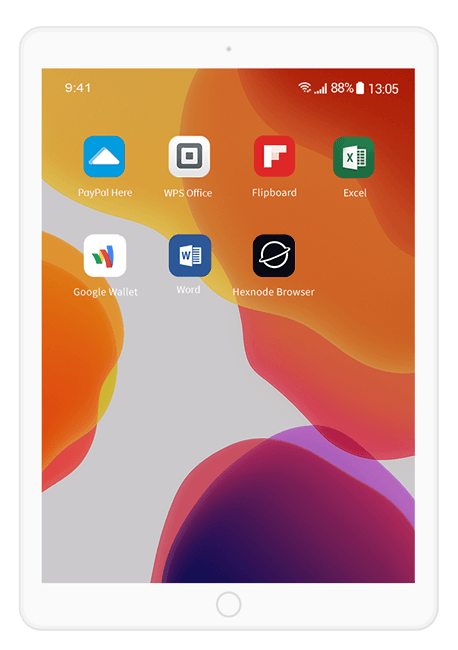
Kiosk Device Management is the process of configuring, monitoring and securing kiosk devices that businesses use for smooth operations. These devices are commonly deployed in industries such as retail, hospitality, healthcare and corporate offices. For IT teams, effective kiosk device management ensures kiosks only run the required applications while maintaining security and performance. Here are the key aspects of kiosk device management:
- Configuration of Devices: IT teams configure kiosk devices to allow only specific applications and functions. This keeps the user experience focused and prevents misuse.
- Security Management: Kiosks often handle sensitive data, so ensuring device security is essential. Proper security settings and updates protect devices from risks.
- Monitoring and Performance: Regular monitoring allows IT teams to detect issues quickly and maintain smooth performance across all deployed kiosks.
- Improved Customer Experience: Well managed kiosks provide faster service, reduce waiting time and create a more reliable interaction for users.
- Higher Uptime and Reliability: With structured management, kiosks remain available for use more consistently, which supports business continuity.
Understanding kiosk device management is the first step for IT teams to maintain control and efficiency. By focusing on configuration, security and performance, businesses build a strong foundation for kiosk operations. Next, we will explore deeper strategies in the ultimate guide to kiosk management that can take these benefits even further.
Why IT Teams Need Kiosk Device Management?
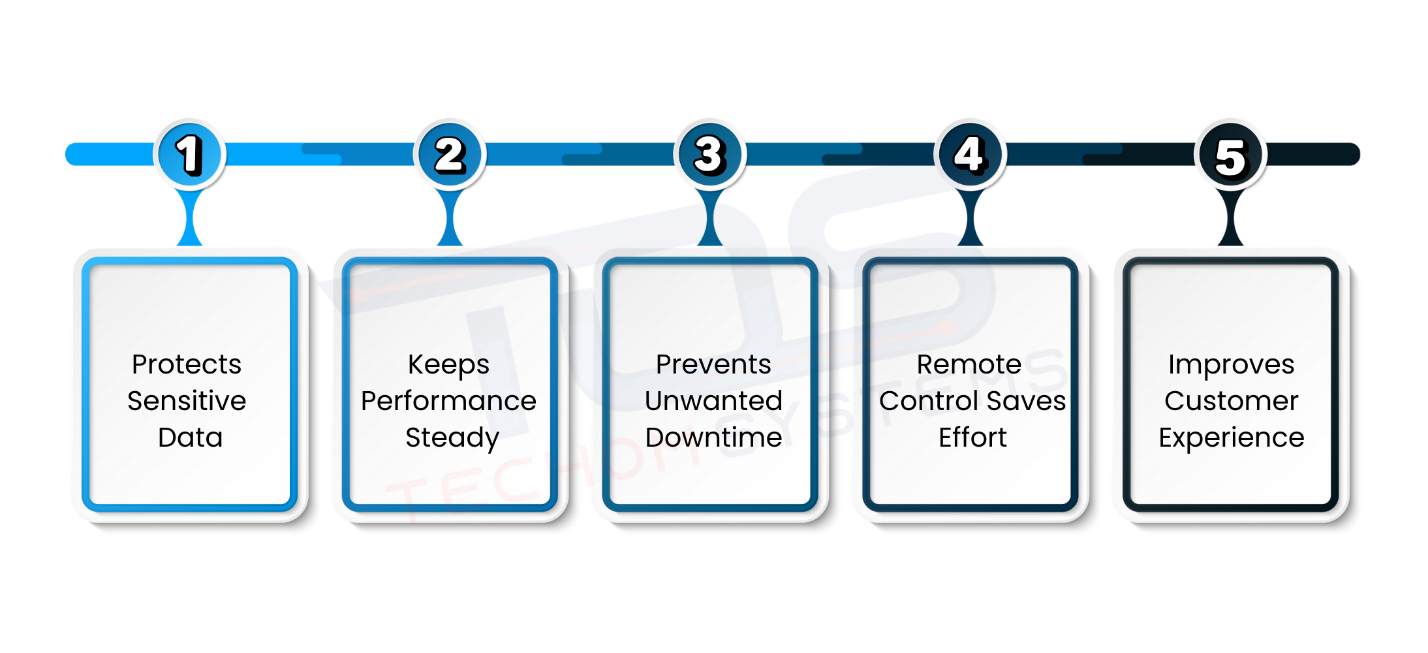
Let’s Imagine you walk into a store and use a self service kiosk. If the screen is slow, the app crashes or the payment option does not work, chances are you will feel frustrated and leave with a bad impression. Now think from the IT team’s side. They are responsible for making sure such problems never happen. This is where kiosk device management becomes a game changer. Here is why IT teams cannot afford to ignore kiosk device management:
#1: Protects Sensitive Data
Kiosks are not just machines, they often handle customer information and payments. Without proper management, these devices become easy targets for misuse. With kiosk device management, IT teams can lock down access, apply security patches quickly and keep confidential data safe from cyber threats.
#2: Keeps Performance Steady
A slow kiosk can ruin the customer’s experience in seconds. By restricting unnecessary apps and ensuring only essential ones run, IT teams can keep the device smooth and reliable. Consistent performance not only keeps customers happy but also builds trust in the brand.
#3: Prevents Unwanted Downtime
Every minute a kiosk is down, businesses lose customers and revenue. With kiosk device management, IT teams can identify technical issues early and fix them before they turn into costly downtime. This proactive approach keeps kiosks available whenever customers need them.
#4: Remote Control Saves Effort
Managing kiosks manually at multiple locations is time consuming and expensive. With kiosk device management, IT teams can monitor, update and troubleshoot devices remotely. This saves travel costs, reduces response times and allows quick fixes without physical presence.
#5: Improves Customer Experience
At the end of the day, customers only care about smooth service. When kiosks work quickly, offer secure payments and deliver a hassle free process, customers leave satisfied. That positive impression boosts brand loyalty and encourages repeat visits.
Kiosk device management is not just a technical task, it is the backbone that ensures IT teams keep kiosks secure, reliable and user friendly. When managed well, kiosks become powerful tools that boost customer trust and business growth.
Step By Step Guide To Kiosk Device Management
Kiosk device management is more than just setting up a device and letting it run. It involves a full process of planning, configuration, monitoring and maintenance to make sure the devices deliver consistent performance. In today’s fast paced industries like retail, education, healthcare and hospitality, kiosks have become an important touchpoint between businesses and customers. Whether used for check ins, self service orders or digital signage, these devices need to be well managed to avoid downtime and security risks.
This step by step guide to kiosk device management walks you through kiosk device setup and configuration, helping businesses create a smooth, efficient and reliable system for growth.
Step 1: Identify the Purpose of the Kiosk
The foundation of effective kiosk device management starts with defining the purpose. Is it for customers to check in, make payments or browse product details? Clearly identifying the use case will help you choose the right hardware, operating system and apps. Here’s what to consider:
- Retail stores may need interactive displays for promotions.
- Healthcare facilities may use kiosks for patient check ins.
- Educational institutes may use them for e learning access.
When you are clear on the purpose, every other decision becomes simpler and more aligned.
Step 2: Choose the Right Devices
Not every device is designed to work as a kiosk. Your choice depends on where and how it will be used. Keep in mind the following:
- Rugged devices are ideal for tough environments like warehouses or outdoor kiosks.
- Tablets or touch screens are great for in store customer engagement.
- Large displays can be used for advertising or information boards.
Selecting the right device ensures stability, performance and a longer lifespan, reducing replacement costs in the future.
Step 3: Kiosk Device Setup and Configuration
This step is crucial as it decides how the kiosk will function. Configuration includes installing the operating system, locking the device into kiosk mode and allowing only specific apps to run. Focus on these actions:
- Restrict access to settings that end users do not need.
- Enable auto launch for the main kiosk application.
- Set up time out sessions to protect user data.
Good configuration ensures the kiosk only serves its intended purpose without distractions.
Step 4: Secure the Devices
Security cannot be an afterthought. Kiosks often handle sensitive information like payments or personal details. Make sure to:
- Enable encryption to protect stored data.
- Use strong authentication for admin access.
- Block unnecessary apps or websites.
By securing devices early, you prevent potential misuse and cyber threats.
Step 5: Install Device Management Software
Manually managing multiple kiosks is time consuming. Device management platforms such as Mobile Device Management (MDM) or Unified Endpoint Management (UEM) make it much easier. Keep in mind:
- Monitor all kiosks from a single dashboard.
- Push software updates remotely.
- Track device health and status in real time.
This step transforms kiosk device management into a streamlined and efficient process.
Step 6: Set Usage Policies
Kiosk device setup and configuration is incomplete without clear usage rules. Policies define what users can or cannot do. Think about these points:
- Restrict browsing to approved apps or websites.
- Block installation of new apps.
- Define time limits for user interaction.
Such policies ensure consistency and reduce the risk of misuse.
Step 7: Enable Remote Monitoring
Remote monitoring allows you to detect issues before they impact users. Focus on:
- Keep track of device battery, memory and connectivity.
- Spot software crashes instantly.
- Take corrective actions quickly through remote commands.
This not only saves time but also reduces downtime and increases customer satisfaction.
Step 8: Schedule Regular Updates
Devices need updates to stay secure and perform well. With MDM or UEM, you can schedule updates automatically. Remember to:
- Apply security patches on time.
- Keep applications updated for smooth performance.
- Reduce risks of outdated software vulnerabilities.
Automating updates ensures kiosks are always running the latest versions without manual effort.
Step 9: Monitor Network Connectivity
Without stable internet, most kiosks fail to deliver their purpose. Keep these in mind:
- Configure backup networks to avoid downtime.
- Use monitoring tools to track performance.
- Ensure secure connections to prevent data leaks.
Connectivity plays a direct role in user experience so it must be monitored closely.
Step 10: Train Staff and Users
Even the best managed kiosks need proper training for those who oversee them. Make sure to:
- Train staff on handling device errors.
- Provide guidelines on troubleshooting.
- Educate end users through simple on screen instructions.
When people understand how to use and manage kiosks properly, the chances of problems decrease significantly.
Step 11: Perform Regular Maintenance
Like any machine, kiosks need maintenance to remain reliable. Remember to:
- Clean hardware regularly.
- Check system performance weekly.
- Replace faulty components on time.
Proactive maintenance prevents sudden breakdowns and keeps the devices ready for heavy use.
Step 12: Review and Optimize
Finally, keep analyzing how kiosks are performing and how users interact with them. Focus on:
- Collect customer feedback.
- Track device reports from management software.
- Upgrade features when needed.
Regular review ensures your kiosk device setup and configuration always meets evolving business needs.
Effective kiosk device management is about planning, securing, monitoring and constantly improving. By following this step by step guide to kiosk device management, businesses can ensure their kiosks deliver maximum performance, reduce downtime and create a smooth user experience.
Want expert help in setting up or managing your kiosk devices? Book a free consultation with TECHOM Systems and make your kiosks smarter, easy and reliable. Click below to get started.
Best Practices For Kiosk Device Security
When you place kiosk devices in public spaces, they instantly become a target for both heavy use and potential threats. From processing payments to handling personal data, kiosks often store sensitive information that needs strong protection.
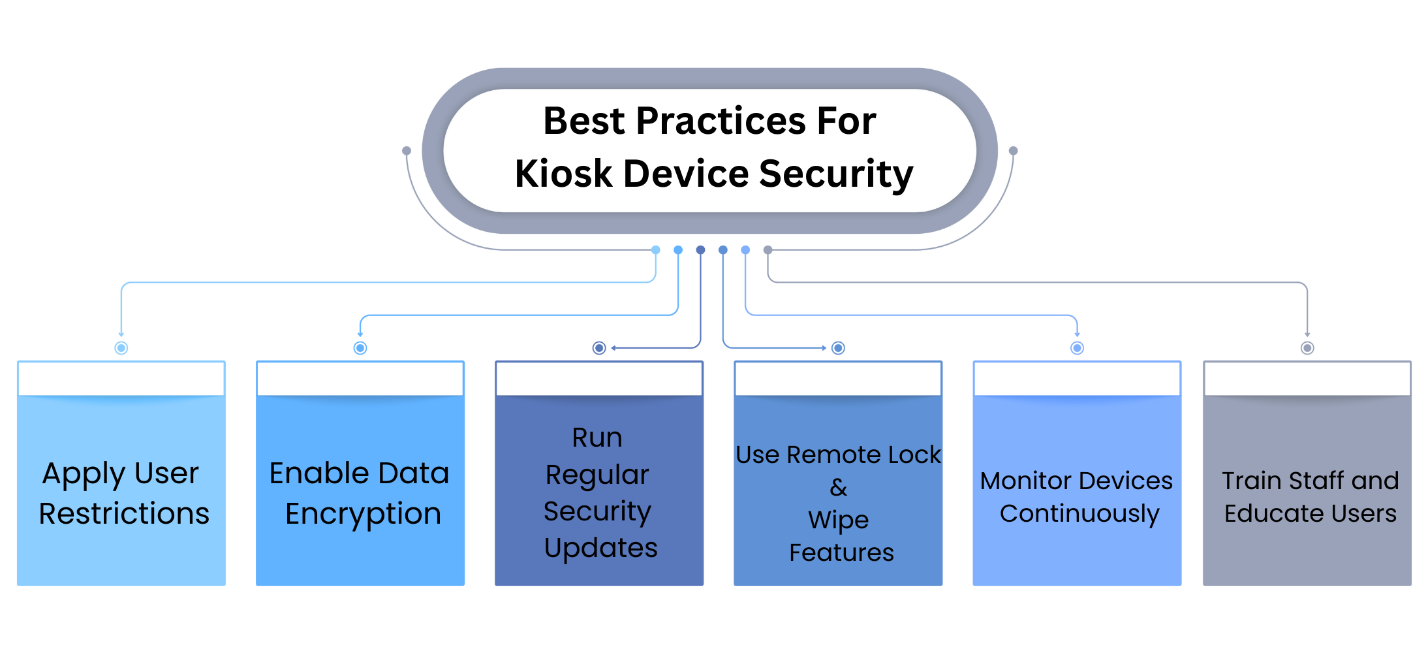
If they are not secured properly, businesses risk data loss, financial damage and even reputational harm. This is why following the best practices for kiosk device security is not just an option but a necessity. Here are the most effective steps businesses can take:
1. Apply User Restrictions
Think of kiosk devices like a locked cabinet. Only the right people should be able to open it. By restricting kiosks to a single app or specific functions, businesses can prevent misuse. When users cannot access settings or install unwanted apps, the risk of tampering is almost zero. For example, if it is a payment kiosk, it should only show payment options and nothing else.
2. Enable Data Encryption
Data flowing through kiosks can be highly sensitive. Encryption acts like a secret code that scrambles this information, making it unreadable if intercepted. This way, even if someone tries to hack into the system, the data remains safe. For businesses, enabling data encryption also shows customers that their information is treated with care.
3. Run Regular Security Updates
Kiosk devices are like any other digital system. If the software is outdated, it opens the door to attacks. Running regular updates ensures the latest security patches are in place. This habit not only protects against cyber threats but also improves the overall performance of the kiosks. Updates should ideally be scheduled during off hours so that users are not disturbed.
4. Use Remote Lock and Wipe Features
Imagine a kiosk gets stolen or compromised. Without remote security features, sensitive data could fall into the wrong hands. With remote lock and wipe, IT teams can instantly disable the device or erase its data, protecting the business from bigger risks. This is especially valuable for kiosks that handle payments or confidential customer details.
5. Monitor Devices Continuously
Problems can often be detected before they turn into real threats. Continuous monitoring helps track unusual activities such as repeated login failures or unauthorized changes. It also allows IT teams to keep an eye on device health and usage. This proactive approach means businesses can stay ahead of potential security breaches.
6. Train Staff and Educate Users
Even with the strongest security measures, human error can cause issues. Training staff on kiosk security best practices ensures that they know how to respond in risky situations. Simple awareness like avoiding unsecured networks or reporting suspicious activity can make a big difference. For customer facing kiosks, adding short on screen instructions can guide users and reduce misuse.
When businesses follow these best practices for kiosk device security, they create a safe environment for both employees and customers. A secure kiosk doesn’t just protect data, it also builds trust and gives users confidence in the brand.
Troubleshooting Kiosk Devices: Common Problems and Smart Solutions
Let’s Imagine this, a customer walks up to a kiosk to recharge their phone order food or print a ticket. They expect it to work instantly, but suddenly the screen hangs or the app refuses to load. In just a few seconds the customer feels frustrated and the business risks losing trust. Troubleshooting kiosk devices is not just about fixing errors, it is about ensuring smooth experiences that keep users satisfied. Here are the most common problems businesses face with kiosks and how to solve them effectively:
Problem 1: Frozen Screens
Customers tap multiple times, but the screen stays unresponsive. This usually happens due to system overload or poorly optimized apps running in the background.
💬 Solution:
- Restart the device to clear temporary glitches.
- Regularly monitor system resources to spot performance issues early.
- Close unnecessary apps and schedule preventive maintenance to prevent future freezes.
Problem 2: Connectivity Issues
A kiosk in a busy shopping mall or airport loses internet while processing payments. This creates long queues and reduces customer confidence.
💬 Solution:
- Perform regular network checks and ensure backup connections like mobile hotspots are ready.
- Use real time monitoring tools to alert IT teams instantly when a kiosk goes offline.
- Proactively fix connectivity issues before they impact users.
Problem 3: App Errors
Apps may crash or fail to open, leaving customers stuck mid use. For example, a food ordering kiosk may close the app just as the customer is about to pay.
💬 Solution:
- Keep all applications updated and test them before deployment.
- Monitor app performance to detect issues early.
- Use remote updates to fix bugs instantly without waiting for manual intervention.
Problem 4: Slow Manual Fixes
Sending technicians on site for every issue can be time consuming and expensive. Customers get frustrated while waiting hours for a fix.
💬 Solution:
- Use remote troubleshooting tools to access kiosks instantly.
- Restart devices, clear errors or push updates from anywhere.
- Reduce downtime and ensure faster recovery for a seamless customer experience.
Problem 5: Repeated Issues
Recurring errors can frustrate IT teams and users alike. Without proper documentation, the same problems are diagnosed repeatedly, wasting time and resources.
💬 Solution:
- Build a knowledge base documenting common problems and their solutions.
- Apply proven fixes faster for recurring issues.
- Continuously update the guide as new issues appear to improve efficiency.
Troubleshooting kiosk devices is not only about technical fixes, it is about protecting customer experience and business reputation. The faster issues are identified and solved, the more reliable the kiosk becomes. With proactive monitoring, remote tools and proper documentation, businesses can ensure that their kiosks remain efficient, trustworthy and user friendly.
Buying Factors To Consider Before Choosing A Kiosk Device Management Solution
When choosing a kiosk device management solution, IT teams face many options and features to consider. Some factors are essential for keeping kiosks secure, reliable and efficient, while others determine how easy it is to manage devices across locations.
To make this decision easier, we have summarized the key buying factors in the table below. This table highlights why it matters and how it benefits your IT team in day to day operations:
| Buying Factor | Why It Matters | How It Helps IT Teams |
|---|---|---|
| Scalability for Large Deployments | Can handle multiple kiosks across locations | Supports business growth without slowing down operations |
| Integration with Existing IT Infrastructure | Works seamlessly with current systems | Saves time, avoids conflicts and ensures smooth operations |
| Remote Management Capabilities | Manage kiosks from anywhere | Reduces downtime and allows quick troubleshooting |
| Security and Compliance | Protects sensitive data and meets regulations | Keeps devices safe and ensures business compliance |
| Ease of Use and User Experience | Simple and intuitive system | Reduces training needs and makes kiosk management efficient |
| Cost Efficiency and Long term ROI | Balances initial cost with long term savings | Reduces maintenance costs and prevents losses from downtime |
Choosing the right kiosk device management solution ensures IT teams can keep kiosks secure, reliable and efficient. A well selected solution improves customer experience and boosts business growth.
Why TECHOM Systems Is The Right Choice For Kiosk Device Management?
Managing multiple kiosks and devices can be tricky for any IT team. TECHOM Systems makes it simple with Hexnode UEM, helping businesses stay secure, efficient and in full control. Here’s why so many businesses trust us:
- Unified Endpoint Management: We provide a single solution to manage all your devices, keeping security and operations seamless across different platforms.
- Mobile Device Management: Our Mobile Device Management solution lets you easily control and secure your mobile devices, protecting sensitive data while improving workflow efficiency for your team.
- Hexnode UEM for Windows: Keep your Windows devices running smoothly with strong management and performance monitoring.
- Digital Signage Software: Turn your displays into engaging communication tools that deliver dynamic content without any hassle.
- Kiosk Lockdown Management: Control kiosk functionality and ensure users only access what they are supposed to, creating a smooth and safe experience.
- Rugged Device Management: Manage devices built for tough environments with confidence, ensuring reliability for industries that demand durability.
- IoT Management: Connect and secure your IoT ecosystem effortlessly, making your operations smarter and more efficient.
Ready to simplify kiosk device management? Book a free consultation with TECHOM Systems today and see how our solutions can make your kiosks smarter and more efficient.
Frequently Asked Questions
#1: What Is Kiosk Device Management?
Ans: Kiosk device management is the process of configuring, monitoring and securing kiosks. It ensures devices run only approved apps, remain safe from threats and deliver a smooth experience to users and customers.
#2: Why IT Teams Should Follow A Step By Step Guide To Kiosk Device Management?
Ans: Following a step by step guide to kiosk device management helps IT teams plan, secure and maintain kiosks systematically, reducing downtime, improving performance and ensuring consistent user satisfaction.
#3: How Can TECHOM Systems Improve Kiosk Device Management?
Ans: TECHOM Systems provides centralized monitoring, remote troubleshooting and tailored solutions, allowing IT teams to manage kiosks efficiently, enhance security and maintain uninterrupted operations across multiple locations.
#4: What Are The Best Practices For Kiosk Device Security?
Ans: Best practices include restricting user access, encrypting sensitive data, applying regular updates and enabling remote lock and wipe. These steps protect kiosks from misuse, cyber threats and data breaches.
#5: How Do IT Teams Troubleshoot Kiosk Devices Effectively?
Ans: IT teams can troubleshoot kiosk devices effectively by using remote tools, documenting recurring issues, monitoring performance metrics and applying timely software updates to prevent future problems.
Final Thoughts
In this step by step guide to kiosk device management, we explored everything IT teams need to keep kiosks running smoothly. You learned how to set up and configure kiosks, secure devices, troubleshoot common issues and apply best practices for consistent performance. We also covered important buying factors for choosing the right kiosk device management solution and highlighted how effective management improves customer experience and business efficiency.
By following these steps, IT teams can reduce downtime, protect sensitive data and ensure kiosks remain reliable touchpoints for customers. Each strategy discussed in this guide is designed to make kiosk management simpler, smarter and more efficient.
Are you ready to take your kiosk management to the next level?
Contact TECHOM Systems today or book a free consultation to see how our solutions can make your kiosks more secure, efficient and user friendly. Click the button below to get started.

Paige’s 12+ years in tech, cloud solutions and AI innovation have shaped her into a translator of complexity into clarity. She specializes in turning technical strategies and unstructured ideas into actionable, understandable plans for teams and stakeholders. Paige thrives on creating content, workflows and processes that make IT systems accessible, while maintaining accuracy and strategic focus. Her calm, thoughtful approach ensures projects stay on track and teams feel supported, bridging gaps between technology and people. Paige believes clarity in technology is the first step toward meaningful business outcomes.